
Release Notes - 20th May, 2026
This release brings significant upgrades to AI Moderator, richer analytics for Video Response, deeper control over Themes, and AI-powered interpretation directly on your results page, alongside a number of fixes to improve platform stability and reliability.
New Features
1. AI Analytics for Video Response
Video Response | Results
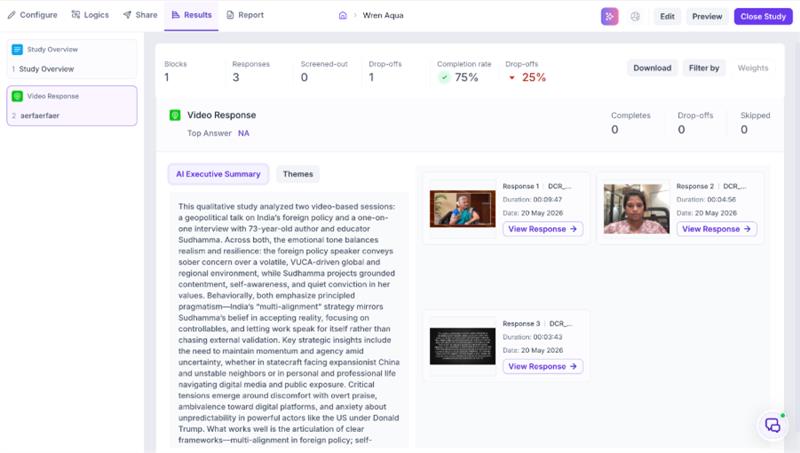
Decode now supports highlight creation directly within the Video Response block on the results page.
Overall Insights
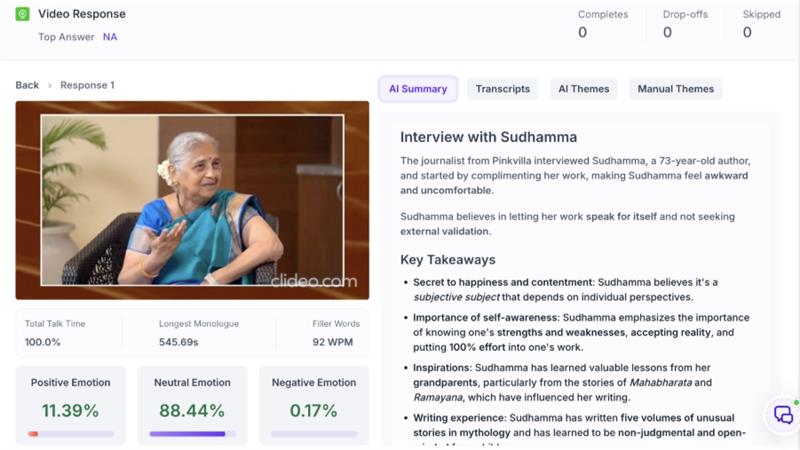
Individual Video Insights
What you can do
When reviewing open-ended video responses from participants, you can now mark key moments in the video and generate short highlight clips from those moments, directly within the results page.
Why it matters
Video responses often carry the most in-depth feedback from participants. Previously, extracting and sharing those moments required manual effort outside the platform. With this update, the most important parts of a response can be clipped and shared in minutes, making video analysis as efficient as any other block type in Decode.
2. Extended Voice Options in AI Moderator
AI Moderator | Meeting Settings
AI Moderator now includes voice options that match the configured session language in the Meeting Settings.
What you can do
When setting up an AI Moderator study, you can now select a voice that matches the language and region of your participant group. The available voice options will reflect the language configured for the session.
Why it matters
The voice of the AI moderator plays a significant role in how comfortable participants feel during a session. A voice that matches the participant's language and cultural context creates a more natural experience, leading to more engaged and open responses.
3. Enhanced Themes Filter with Persistent Multi-Dimensional Controls
AI Moderator | Themes | Analytics
The Themes panel in AI Moderator analytics now supports combined filtering across multiple dimensions, with filter selections that persist as you navigate across the platform.
What you can do
You can now filter themes simultaneously by:
- Emotion type (such as Excitement, Confusion, or Neutral)
- Specific Interview or media file
- Insight type (Pain Point or Opportunity)
Filters stay active even when you move to another tab or section and come back, so your analysis view is always preserved.
Why it matters
Research analysis often requires looking at themes through multiple lenses at once. Previously the Themes panel only allowed basic filtering and any applied filters were lost on navigation. This update gives researchers much more precise control over how they explore AI-detected themes and removes the frustration of reapplying filters every time they switch views.
4. AI Insights Drawer: Block-Level AI Interpretation and Recommendations
Results | All Studies
A new AI-powered insights drawer is now available on the results page for a set of block types, generating instant interpretation and recommendations based on each block's response data.
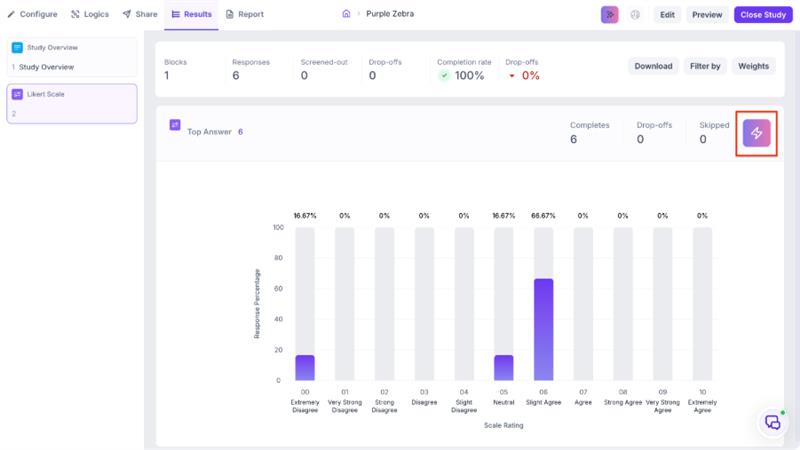
Insights Page
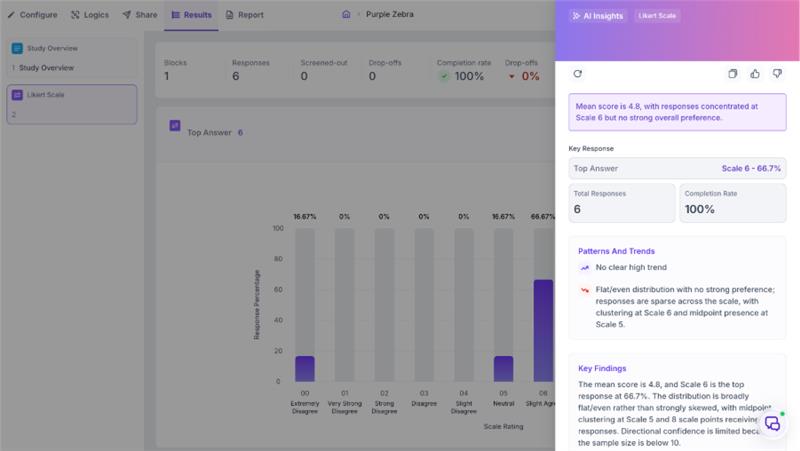
What you can do
On any results page, open the AI Insights Drawer for a supported block to get an instant summary of responses, key patterns and anomalies, an explanation of what the data suggests, and recommended next steps. The drawer is currently available for the following block types:
- Date & Time
- Dropdown
- Likert Scale
- Like / Dislike
- Multiple Choice
- Ranking
- Smiley Rating
- Star Rating
- Text
- Net Promoter Score (NPS)
Why it matters
Until now, interpreting block-level results required researchers to manually read charts and draw conclusions, a process that is time-consuming, prone to missing patterns and heavily dependent on research experience. The AI Insights Drawer brings interpretation directly into the results page, making insights accessible to every team member regardless of their research background and significantly reducing the time from data to decision.
5. Improved Video Capture in AI Moderator
AI Moderator | Sessions
AI Moderator sessions now capture the attendee video stream directly, replacing the previous screen recording approach.
What you can do
Participant video is now captured as a direct video stream from the attendee's camera rather than a recording of their screen. This stream is processed by Decode's backend to analyse facial expressions, gaze behaviour, voice tone, and attention signals from the session.
Bug Fixes
AI Moderator
- AI Moderator session summaries were always generated in English, even when the session was conducted in another language. This has been fixed and summaries now generate in the configured session language.
- Publishing an AI Moderator study was taking over 60 seconds, making it feel unresponsive. Study publishing now completes significantly faster.
- During long AI Interview sessions, the transcript and meeting timer were getting cut off and going off screen. Both now stay visible throughout the session regardless of length.
Results & Analytics
- Click data and heatmaps were not being generated for Preference Test and A/B Test blocks. These now generate correctly after responses are collected.
- Downloading results for a study that contained only Image Response blocks was showing an error and no file was generated. The export now works correctly and image responses are included as URLs in the downloaded file.
- In the Image Response results page, long comments were breaking the layout, the cursor was jumping to the wrong position when editing, and tags could be created without entering any text. All three issues have been resolved.
- In Manual Themes, the Add Group button was incorrectly available before any videos were uploaded or while videos were still processing, causing errors when clicked. The button is now disabled until content is ready.
- Opening a file summary after the Copilot credit limit was reached was showing a blank white screen instead of a message. Users will now see a clear message indicating the credit limit has been reached.
- Fixed an intermittent issue where the platform was displaying Decode 1.0 during active usage. Refreshing the page resolved it temporarily but the issue recurred over time. This has now been permanently fixed.
- Fixed an issue where highlights were not being generated correctly for media files containing multiple languages.
- Fixed an intermittent failure in AI insights generation during media processing that required manual intervention from the team to resolve.
- Fixed an issue where transcripts for Chinese and other non-Latin language audio were breaking into individual characters instead of being grouped into words and sentences.
Library
- Selecting multiple studies, folders, or media files at once in the library grid view was not working. Multi-select now works as expected.
Platform
- Several text labels across the Qualitative Live Interview setup flow were unclear or inconsistent. These have been updated to be clearer and more accurate.
Security & Infrastructure
- Improved platform deployment process to ensure the application stays available and responsive during updates, with no disruption to ongoing sessions or studies.
- Strengthened platform security to ensure only requests from trusted and verified sources are accepted, protecting against unauthorized access.
- Secured the way third party video content is accessed on the platform to prevent any risk of credential exposure.