
Release Notes - 19th August
This release introduces improvements to the study preview and study creation experience, along with several fixes across study management, Results, Approval, Task Blocks, and media analysis.
Features
1. Preview Studies Using the Participant Experience
Overview
Study Preview now runs on the same participant experience used for live sessions. This provides a more accurate way to review and validate a study before launching it.
What’s Changed
Preview now uses the same experience as a live participant session, including:
- Study flow and branching
- Piping and randomisation
- Timers
- Media and stimulus experiences
- Prototype and task experiences
- Study logic and conditions
Preview sessions are separate from live sessions and do not affect study results or reporting.
Unready blocks are also identified before the preview starts, helping researchers understand which parts of the study may need attention.
Why This Matters
- Provides a more accurate representation of the participant experience.
- Helps researchers validate study flow before launch.
- Allows researchers to preview more block types and study scenarios.
- Keeps preview sessions separate from live study results and reporting.
2. Study Name Required During Study Creation
Overview
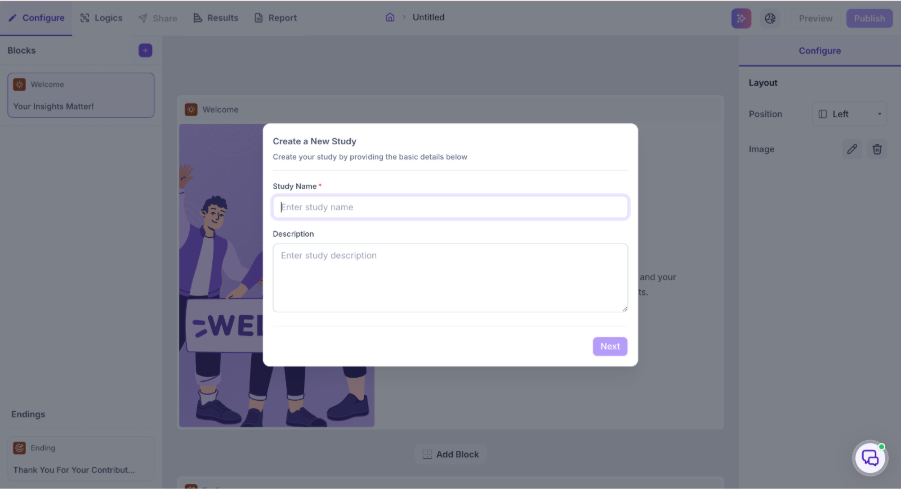
Study names are now required when creating a new study, making it easier to identify and manage studies across Decode.
What’s Changed
- Auto-generated study names have been removed.
- Researchers must enter a Study Name when creating a study.
- A validation message is shown if the field is left empty or contains invalid input.
- The study name is retained consistently across the platform, including the Study List, Details page, and Reports.
Why This Matters
- Makes studies easier to identify.
- Helps keep studies organised when working across multiple projects.
- Reduces confusion caused by generic or automatically generated study names.
Bug Fixes
1. Rename functionality not working in Grid View
The Rename option is available for studies in Grid View, but clicking it does not trigger any action. Users can now rename studies directly from Grid View.
2. Incorrect block count in Results
Blocks within Group & Randomization were not included in the block count shown in Results. The count now includes all study and media blocks within Group & Randomization, while excluding Welcome, Error, Thank You, Screenout, and Group & Randomization blocks.
3. Pending Requests appearing under Previous Actions
Entries from Pending Requests could appear in the Previous Actions section of the Approval Block after repeated scrolling and navigation. The Previous Actions section now displays only completed or processed approval actions.
4. Incorrect title displayed in Defined Journey
The Defined Journey for a Task Block could display an incorrect title, such as api.qa, instead of the actual URL or page title. The correct title is now displayed when the interaction takes place within the same URL.
5. Blocks within Group & Randomization becoming inaccessible
Deleting a question block placed after a Group & Randomization block could make the blocks within Group & Randomization inaccessible or uneditable. The blocks can now be accessed and edited as expected.
6. Unexpected UI when creating a study from Settings
Additional UI elements, such as dropdowns and extra text, could appear when creating a study from Settings. The Create Study experience now displays only the expected study type options.
7. Multiple Choice special options not moving to the bottom
After using Bulk Import, None of the Above, Other, and All of the Above could remain in their previous positions instead of moving to the bottom of the options list. These options now move to the bottom as expected.
8. Facial Redaction not working in thumbnails and Highlights PIP video
When Facial Redaction was enabled, redaction was not applied correctly to thumbnails and the Highlights PIP video. Facial Redaction now works correctly in these areas.
9. Video snippets not loading with Facial Redaction enabled
Video snippets were not loading in Highlights, Themes, and Analytics when Facial Redaction was enabled. The video snippets now load correctly in these views.