
Release Notes - 6th August, 2026
This release introduces significant enhancements across Qualitative Research, Study Creation, Decode Copilot, and the overall platform experience.
Key highlights include a revamped Individual Media Analytics experience with enhanced Summary, Transcript, Highlights, and Analytics views for qualitative recordings, bulk media upload through the file browser to simplify study creation, enhanced Decode Copilot with richer AI Creative metrics and persona-level insights, the ability to trigger Advanced Analytics for individual media directly from the Media Library, along with several UI/UX improvements and bug fixes to improve usability, platform stability, and the overall research experience.
New Feature
1. Revamped Individual Media Analytics
Overview
We've redesigned the Individual Media Analytics experience for qualitative recordings, introducing a more structured and intuitive interface that helps researchers review interviews, validate findings, and uncover actionable insights more efficiently.
The updated experience enhances the existing Summary, Transcript, Highlights, and Analytics sections, making it easier to move from AI-generated insights to detailed conversation analysis while maintaining context throughout the research workflow.
What's Changed
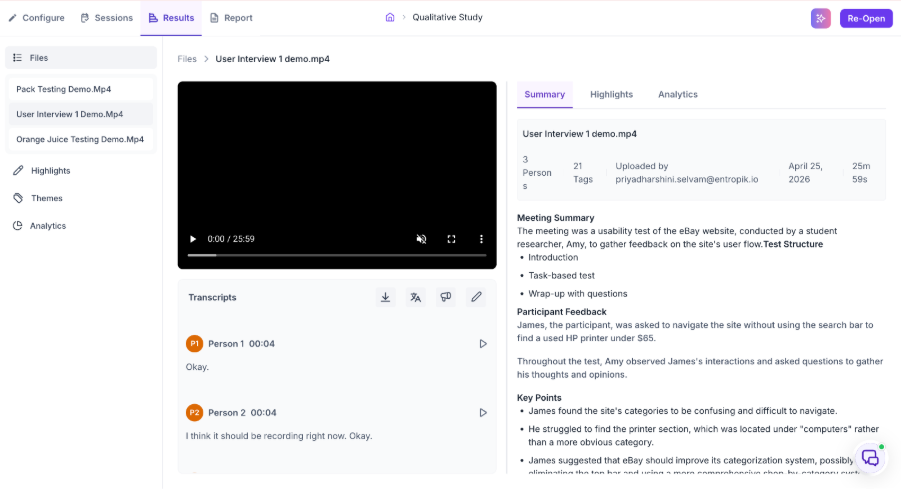
Redesigned Summary Experience
The Summary section has been redesigned to provide a more structured overview of each recording. Researchers can quickly understand the interview through AI-generated meeting summaries, participant information, key discussion points, research snapshots, and actionable recommendations before exploring the recording in detail.
Enhanced Transcript Experience
The Transcript experience has been refined with an improved layout and easier access to actions such as download, translation, sharing, and annotations. The updated interface makes it easier to review conversations, navigate participant responses, and collaborate on research findings.
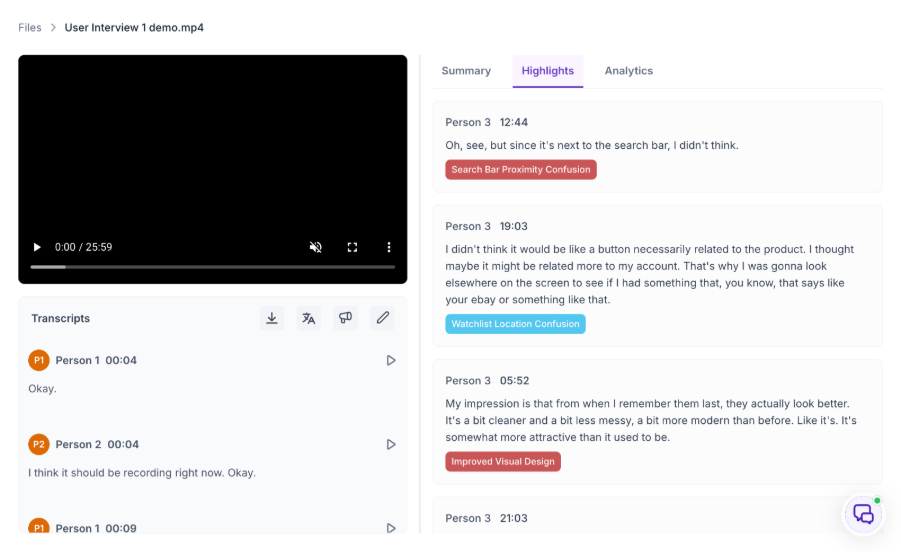
Enhanced Highlights Experience
The Highlights section has been redesigned to present key moments from the interview in a more structured format. Researchers can easily review important observations, supporting participant quotes, timestamps, and navigate directly to relevant moments in the recording for faster evidence validation.
Enhanced Analytics Experience
The Analytics experience has been significantly enhanced to provide deeper conversation intelligence through richer qualitative analytics and interactive visualizations. The redesigned experience brings together key behavioral, emotional, and conversational metrics in a more structured format, enabling researchers to better understand participant interactions, conversation dynamics, and overall engagement throughout the session.
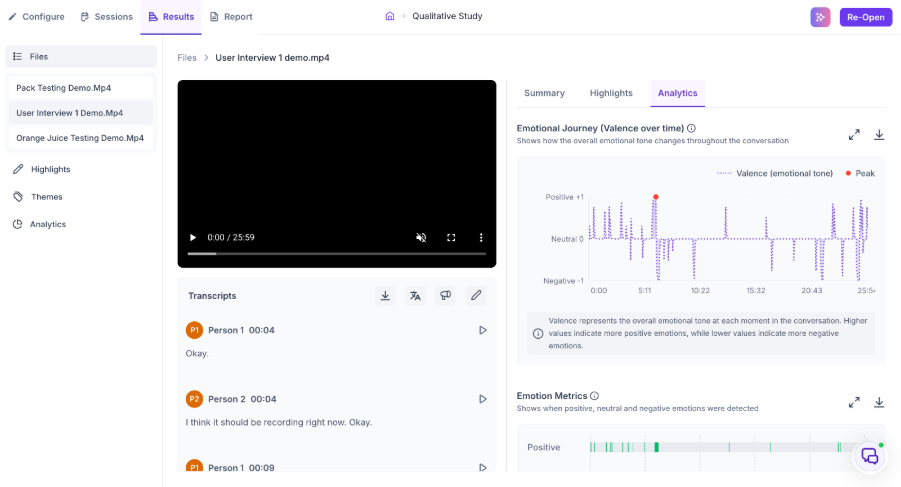
Key enhancements include:
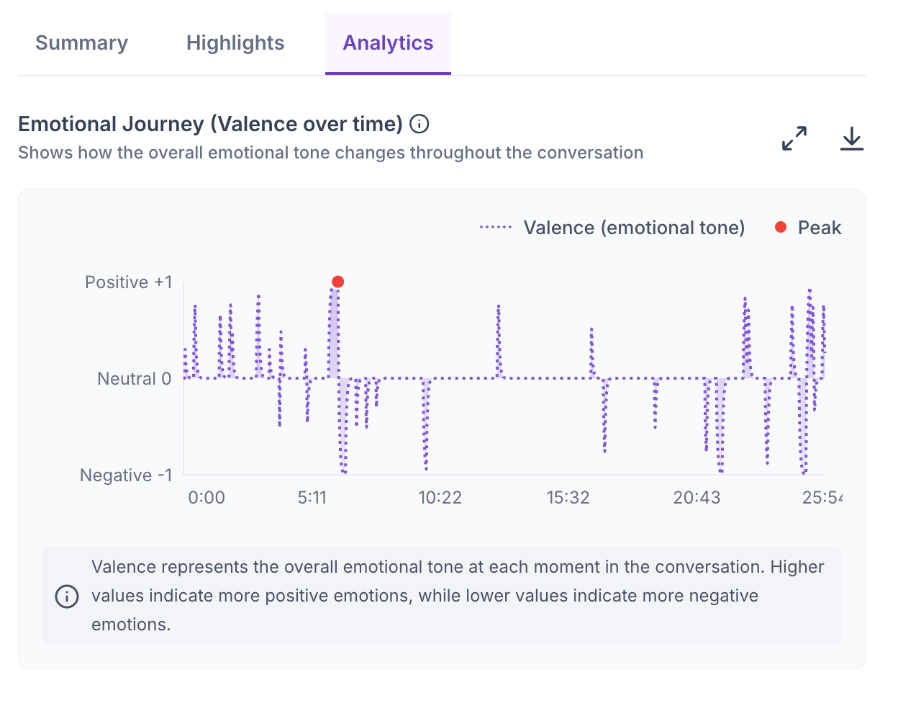
Emotional Journey (Valence Over Time): Visualizes how participants' emotional responses change throughout the conversation, helping identify moments that triggered positive, neutral, or negative reactions.
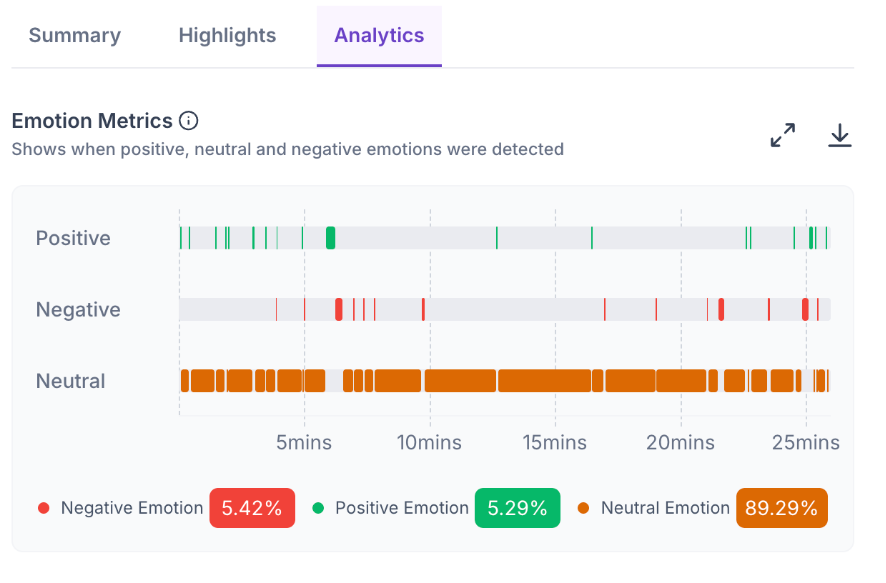
Emotion Metrics: Provides an overview of the distribution of participant emotions, enabling researchers to better understand the overall emotional sentiment during the session.
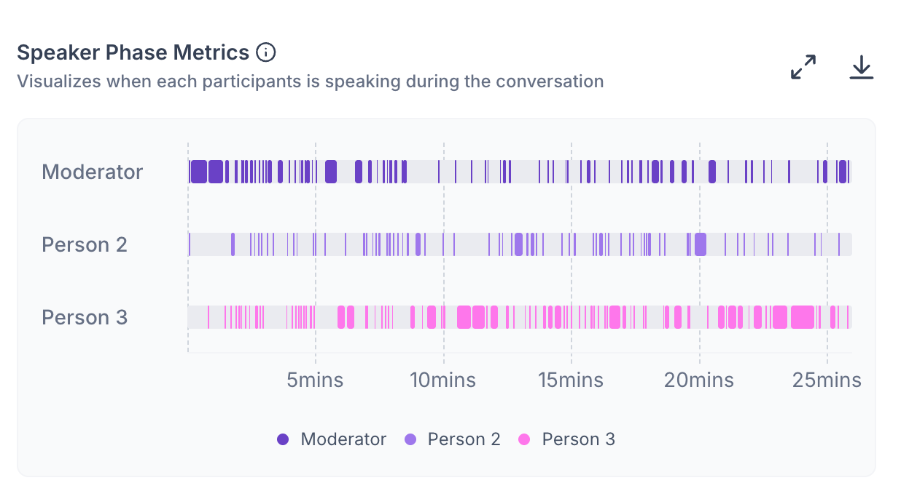
Speaker Phase Metrics: Analyzes speaking patterns between moderators and participants, offering insights into conversation balance, participation, and interaction flow.
Conversation Analytics: Delivers deeper insights into conversation dynamics, helping researchers understand participant engagement, discussion patterns, and overall conversation quality.
Together, these enhancements provide researchers with richer context beyond transcripts, making it easier to interpret participant behavior, validate qualitative findings, and uncover actionable insights.
Why This Matters
- Enables researchers to understand interviews faster through a more structured AI-powered summary.
- Simplifies navigation between summaries, transcripts, highlights, and analytics.
- Makes it easier to validate findings using organized evidence, participant quotes, and timestamps.
- Provides richer conversation and emotion analytics for deeper qualitative insights.
- Delivers a more intuitive and efficient workflow for analyzing qualitative research sessions.
Business Impact
The revamped Individual Media Analytics experience provides a more intuitive, AI-powered workflow for qualitative research. By enhancing the Summary, Transcript, Highlights, and Analytics experiences, researchers can review interviews faster, validate insights with confidence, and derive meaningful findings more efficiently. This enhancement strengthens Decode's qualitative research capabilities and provides a more compelling experience during customer demonstrations and enterprise evaluations.
2. Bulk Upload Stimuli via File Browser
Overview
We've enhanced the media upload experience by introducing bulk stimulus upload through the file browser. Researchers can now select and upload multiple media files in a single action, making it faster and more efficient to create studies with multiple stimuli.
The enhancement also intelligently handles upload limits and validation, ensuring a smooth upload experience without interrupting the workflow.
What's Changed
Bulk Media Upload
Researchers can now select and upload multiple media files simultaneously through the file browser, eliminating the need to upload each stimulus individually.
Automatic Upload Limit Handling
If the number of selected files exceeds the maximum supported stimulus limit, the platform automatically imports only the permitted number of files while skipping the remaining files.
Instead of failing the entire upload, users receive a clear notification indicating how many files were successfully uploaded and how many were skipped.
Improved Upload Validation
File validation has been enhanced to process uploads more efficiently. Invalid files are identified individually without interrupting the upload of valid files, allowing researchers to continue their workflow with minimal disruption.
Preserved Upload Order
Uploaded stimuli maintain the order in which they were selected, helping researchers organize studies more efficiently without requiring additional manual adjustments.
Why This Matters
- Reduces the time required to upload multiple stimuli.
- Eliminates repetitive file upload actions when building studies.
- Provides a smoother upload experience through intelligent limit handling.
- Ensures valid files continue uploading even if some selected files fail validation.
- Preserves stimulus order, reducing manual reorganization after upload.
Business Impact
Bulk Upload significantly improves the study creation experience for researchers working with multiple stimuli. By reducing manual effort, intelligently managing upload limits, and simplifying validation, this enhancement enables faster study setup, improves overall productivity, and delivers a more seamless content management experience.
Improvement
1. Enhance Copilot with Complete Creative Metrics and Persona-Level Insights
Overview
Decode Copilot now leverages the complete set of AI Creative Insights to deliver richer, more contextual, and actionable responses. By incorporating creative performance metrics, emotional analytics, benchmark comparisons, audience summaries, and persona-level insights, Copilot provides a more comprehensive interpretation of creative performance.
What's Changed
- Utilizes the complete AI Creative Insights dataset, including creative metrics, emotional analytics, benchmark comparisons, audience summaries, and persona-level insights.
- Delivers more contextual responses by explaining not only what performed well but also why.
- Incorporates persona-specific insights and recommendations to help researchers better understand audience behavior.
Business Impact
Researchers can ask more complex questions and receive evidence-backed responses, reducing manual analysis and enabling faster, more informed creative decisions.
2. Trigger Advanced Analytics for Individual Media in the Library
Overview
Researchers can now generate Advanced Analytics directly for individual media files stored in the Media Library, without first creating a study.
What's Changed
- Supports direct processing of individual media files from the Media Library.
- Generates AI-powered analytics for standalone media assets.
- Eliminates the need to create a study solely for media analysis.
Business Impact
Researchers can evaluate individual creatives more efficiently, accelerating media validation and simplifying the analysis workflow.
3. UI & UX Enhancements
Overview
This release introduces several refinements across Decode to improve usability, visual consistency, and the overall user experience.
What's Changed
- Refined layouts, spacing, typography, and component alignment across the platform.
- Improved navigation and interactions across study creation, results, analytics, and demo experiences.
- Updated loaders, tooltips, empty states, and visual feedback to create a smoother user experience.
Business Impact
A more consistent and intuitive interface helps researchers navigate the platform more efficiently, improving day-to-day workflows and the overall user experience.
Bug Fix
1. Updated Card Images Reflected in Results
Card Sort Results now correctly display the latest uploaded card images after they are replaced in the Card Sort block, ensuring consistency between the study configuration, participant experience, and reported results.
2. Removed Temporary "Invalid PDF Structure" Message
The temporary "Invalid PDF Structure" message that briefly appeared before transcripts and AI Summary loaded in Demo Mode has been eliminated. Valid media files now load seamlessly without displaying the incorrect warning.
3. Duplicated Studies Now Appear Immediately
Duplicated studies are now displayed immediately in the Studies list after the duplication process completes, eliminating the need to refresh the page or navigate away to view the newly created study.
4. Approval Workflow UI Restored After Rejection
The approval workflow has been corrected to restore the Request Approval button after an approval request is rejected, allowing users to easily resubmit the approval request when required.
5. Correct File Icons for WAV and M4V Files
File uploads now display the appropriate icons for .wav and .m4v file types, ensuring accurate representation of supported media formats throughout the application.
6. Image Upload Supports File Renaming
Researchers can now rename supported image files before uploading without encountering an incorrect "Unsupported format" validation error, allowing image uploads to proceed successfully.
7. Improved Foreign Language Document Processing
Processing for uploaded Spanish and German documents has been improved to ensure supported foreign language files complete processing successfully instead of remaining in a processing state.
8. Preview Responses No Longer Affect Active Study Metrics
Preview study responses are no longer included in Drop-off or Screen-out metrics for Active Studies, ensuring that study insights accurately reflect only participant activity from published studies.