
Release Notes - 4th June, 2026
This release includes enhancements across AI Reports, Copilot, Quantitative Studies, Study Management, and several platform-wide improvements. We have also addressed key issues across AOI analysis, task flows, panel integrations, calibration workflows, and overall user experience.
New Features / Enhancements
1. AI Reports for Media Collections
AI Reports | Media Collections
Researchers can now generate AI reports for media uploaded within a collection/folder, enabling consolidated analysis across multiple media assets.
What you can do
Generate a single AI-powered report for an entire media collection instead of reviewing individual assets separately. The report consolidates observations, themes, and insights across all media uploaded within the collection.
Why it matters
This significantly reduces analysis effort for studies containing multiple videos, images, or media assets and helps researchers identify patterns and insights more efficiently.
2. Image Response Block Support in AI Reports
AI Reports | Quantitative Studies
AI Reports now support Image Response blocks, enabling image-based responses to be included in AI-powered analysis.
What you can do
When participants upload images as part of a study, AI Reports can now analyze those responses and incorporate image-derived observations into the report alongside other study findings.
Why it matters
Researchers can now generate insights from participant-submitted images without manually reviewing each upload. The report can identify relevant themes, usage context, visibility observations, and other image-based findings, helping teams uncover richer insights from visual responses.
3. Configurable Labels for Likert Scale Questions
Quantitative Studies | Study Configuration
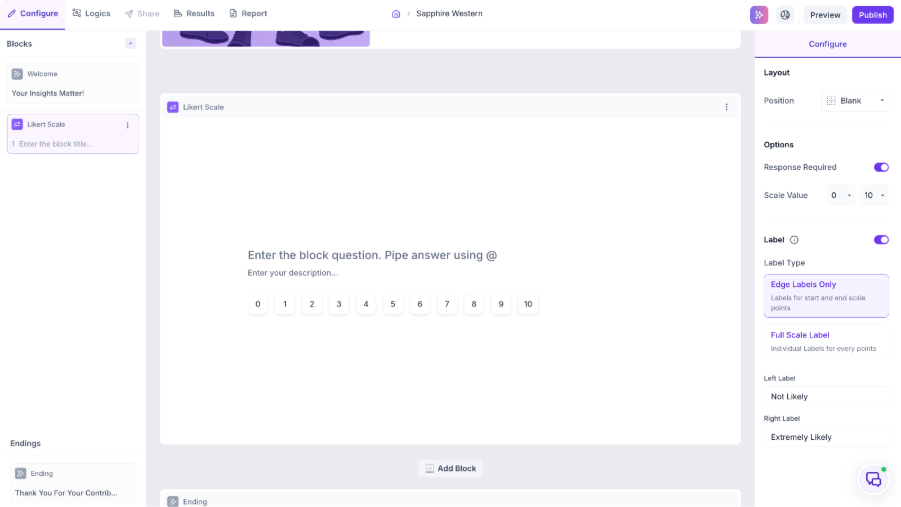
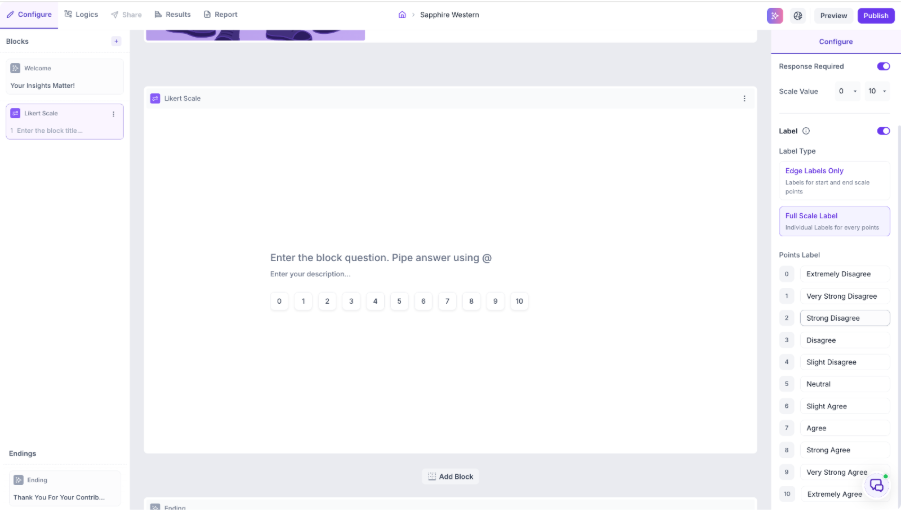
Researchers can now customize labels for Likert Scale questions, providing greater flexibility in how response scales are presented to participants.
What you can do
When configuring a Likert Scale block, researchers can define custom labels for scale values across both 1–5 and 1–7 scales. Labels can be added for individual scale points or only for key anchor points, depending on study requirements. These labels are reflected across Preview Mode, Tester View, and mobile experiences.
Edge labels
Full Scale Label
Why it matters
Standard numeric scales may not always provide sufficient context for respondents. With configurable labels such as Strongly Disagree → Strongly Agree, Very Unlikely → Very Likely, or Poor → Excellent, researchers can improve question clarity, reduce interpretation differences, and create a more intuitive survey experience while maintaining consistency across devices and languages.
4. Improved Speaker Renaming Experience
Qualitative Studies | Transcript Management
The speaker renaming workflow has been enhanced to make transcript review and speaker labeling more efficient.
What you can do
Researchers can rename speaker labels during transcript review to maintain consistent speaker identities across the transcript. This makes it easier to correct speaker naming inconsistencies and ensure the same participant is represented using a common speaker name.
Why it matters
During transcript review, the same participant may sometimes appear under multiple speaker labels. Improved speaker renaming helps maintain consistency, reduces manual cleanup effort, and improves transcript readability and analysis.
5. Enhanced Copilot Experience Across Decode
Copilot | Platform Experience
The Copilot experience has been significantly redesigned to provide a more intuitive, AI-first research workspace across Decode.
What you can do
Researchers can now interact with Copilot through a more streamlined and contextual experience that supports conversational research, richer insight exploration, improved navigation, and enhanced access to research assets. The updated experience is designed to support workflows across Consumer Insights, User Research, Insights Hub, and AI Creative Insights.
Why it matters
Research insights are often spread across studies, reports, and multiple data sources. The enhanced Copilot experience helps researchers discover insights faster, navigate research more efficiently, and interact with AI in a more contextual and workflow-oriented manner, creating a stronger foundation for future AI-powered research capabilities across the platform.
6. Quant Copilot Enhancements
Copilot | Quantitative Studies
Quant Copilot has been enhanced with a revamped architecture, broader study coverage, and improved query handling capabilities.
What you can do
Researchers can now ask more complex questions across survey, UX, and media-based research data. Quant Copilot supports multi-hop queries spanning multiple study components, can interpret Eye Tracking data in addition to First Click data, and provides improved responses for metadata-related questions. The updated experience also handles irrelevant or unsupported queries more effectively.
Why it matters
Researchers often need to connect findings across multiple data sources within a study. With expanded support for UX blocks, media data, Eye Tracking analysis, and cross-study querying capabilities, Quant Copilot can deliver more comprehensive and accurate answers, helping teams uncover insights faster and reduce manual analysis effort.
7. Deep Context Copilot Enhancements
Copilot | Qualitative & Research Context Analysis
Deep Context Copilot has been enhanced to provide richer contextual understanding across research assets and improve the quality of AI-generated responses.
What you can do
Researchers can explore findings using a broader range of contextual inputs, enabling Copilot to connect information across transcripts, study data, highlights, uploaded assets, and other research artefacts. The enhanced experience delivers more relevant responses, improved evidence retrieval, and better context-aware recommendations.
Why it matters
Research insights are often distributed across multiple sources and formats. By leveraging deeper contextual understanding, Deep Context Copilot can surface more meaningful connections, reduce manual review effort, and help researchers arrive at insights faster and with greater confidence.
8. Copilot for Predictive Creative Insights
Copilot | Creative & Advertising Insights
Copilot can now analyze and interpret Predictive Creative Insights, enabling researchers, marketers, and designers to explore creative performance through natural language conversations.
What you can do
Researchers can ask questions about attention, focus, clarity, and overall creative performance without manually reviewing dashboards, heatmaps, or AOI analysis. Copilot can summarize creative performance, explain key metrics, compare multiple creatives, identify high- and low-attention areas, and provide actionable recommendations to improve creative effectiveness.
Users can also compare creatives side-by-side to understand performance differences, identify strengths and weaknesses, and determine which creative is likely to perform better.
Why it matters
Interpreting heatmaps, attention scores, and predictive creative metrics often requires significant manual analysis. By bringing Predictive Creative Insights into Copilot, teams can quickly understand what is working, identify areas for improvement, compare creative alternatives, and make faster, more informed creative decisions through a conversational experience.
9. Platform Usability & Experience Improvements
Platform | User Experience
Several usability enhancements have been introduced across the platform, including a streamlined study header experience, expanded tooltip coverage, updated benchmark scores for media-based studies, and improvements to platform interactions and responsiveness.
What you can do
Researchers can navigate studies more efficiently, access contextual guidance directly within workflows, and benefit from a smoother overall platform experience.
Why it matters
These improvements reduce friction during study setup and analysis, improve feature discoverability, and create a more intuitive research experience across the platform.
10. Study Header Improvements
Study Management | Study Builder
Enhanced the Study Header experience to improve responsiveness, maintainability, and overall usability across study workflows.
What changed
Refined the Study Header experience and streamlined key study management actions to deliver a more stable and consistent workflow while navigating, editing, previewing, and publishing studies
Bug Fixes
1. AOI Loading Fix
AOI Analysis | Study Results
Resolved an issue where newly created AOIs could remain in a loading state until users navigated away and returned to the study.
2. AOI Video Playback Improvements
AOI Analysis | Media Review
Resolved an issue where AOI video playback did not accurately reflect the selected Area of Interest and could display the full media or unrelated regions instead of the chosen AOI.
3. AOI Export Improvements
AOI Analysis | Exports
Resolved an issue where AOI exports did not accurately reflect the selected AOI region, ensuring exported outputs match the configured area of interest.
4. Heatmap & Click Data Visualization Fixes
AOI Analysis | Visual Analytics
Resolved issues affecting Heatmap, Transparency, and Click Data visualizations under specific tracking and calibration configurations.
5. Dynata Exit Link Fix
Panel Integrations
Resolved an issue where participant completions were not being recorded correctly in Dynata due to exit links not being triggered as expected.
6. Task Block Feedback Collection Fix
Task Research | Participant Experience
Resolved an issue where the Collect Feedback page could be skipped in certain task completion scenarios.
7. A/B Testing Time Tracking Fix
A/B Testing | Analytics
Resolved time-spent calculation inconsistencies across A/B testing studies to improve engagement measurement accuracy.
8. Study Access & Navigation Fixes
Platform | Study Access
Resolved an issue where a blank screen could appear when opening a study URL in a new browser tab while logged into Decode.
9. MCQ & Dropdown Alignment Fixes
Quantitative Studies | Study Builder & Tester View
Resolved alignment and layout inconsistencies across MCQ and Dropdown blocks.
10. Camera & Calibration Workflow Fixes
Media Testing | Calibration
Resolved camera initialization and calibration issues that could occur under specific media configuration scenarios.