
Release Notes - 26th June, 2026
This release introduces significant enhancements across AI-powered research workflows, Quant Copilot, qualitative research, AI reporting, study creation, analytics, workspace management, and overall platform experience.
Key highlights include enhanced AI transcripts and summaries, expanded AI Insights across additional study methodologies, a redesigned Qualitative Results experience, improved Quant Copilot capabilities, richer AI-powered presentation generation, and several usability, reporting, and workflow improvements across the platform.
🚀 Major Feature Enhancements
AI & Copilot Enhancements
1. Enhanced AI Transcripts & Summaries
Overview
We've enhanced our AI-powered transcription and summarization capabilities to improve the quality of qualitative research outputs, delivering more accurate transcripts, better speaker identification, and richer AI-generated summaries.
What's Changed
AI processing has been enhanced to produce more accurate transcripts, improved speaker diarization, and richer AI-generated meeting summaries, making qualitative sessions easier to review, analyze, and extract meaningful insights.
Key Impact
- Improves the quality and accuracy of AI-generated transcripts.
- Delivers richer and more insightful meeting summaries.
- Makes qualitative sessions easier to review and analyze.
- Enhances the overall qualitative analysis experience with more reliable AI-generated outputs.
2. Expanded Block-Level AI Insights
Overview
AI Insights now supports a broader range of study methodologies, providing richer, methodology-specific analysis across quantitative, user research, media testing, and qualitative studies.
What's Changed
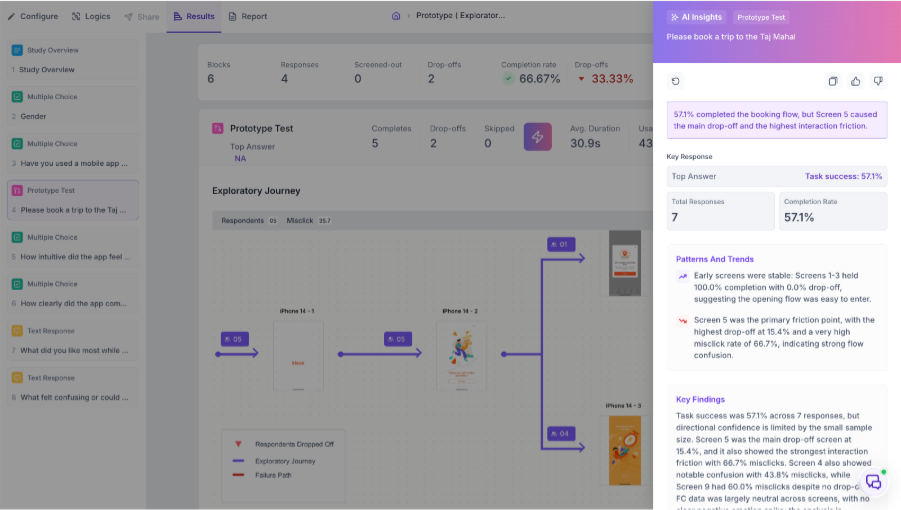
AI-generated block summaries have been expanded to support NPS, Matrix, A/B Test, First Click, Five Second Test, Task Block, Prototype Testing, Media Testing, Image Response, and Video Response studies.
Depending on the study type, AI Insights now surfaces relevant metrics and observations such as respondent preferences, behavioural patterns, task success, attention and emotion analysis, recall performance, themes, and other methodology-specific insights, helping researchers quickly interpret results and identify key findings.
Key Impact
- Expands AI-powered insights across a wider range of study methodologies.
- Delivers methodology-specific summaries tailored to each research method.
- Helps researchers quickly identify behavioural patterns, task success, attention, emotions, recall, themes, and respondent preferences.
- Reduces manual effort required to analyze study results.
3. Enhanced Quant Copilot Intelligence
Overview
Quant Copilot has been significantly enhanced to deliver deeper, more comprehensive insights across quantitative, user research, media testing, and qualitative studies, helping researchers explore their data more effectively through natural language conversations.
What's Changed
Quant Copilot now supports a broader range of study methodologies, metrics, and participant journey analytics. Researchers can now ask natural language questions about study performance, participant behaviour, usability metrics, creative effectiveness, participant journeys, and qualitative findings, receiving contextual responses directly from Quant Copilot.
The experience has also been enhanced to provide greater transparency, improved handling of low-response studies, and more consistent insights across supported research methodologies.
Key Impact
- Expands AI-powered analysis across a wider range of research methodologies and metrics.
- Enables researchers to explore study performance, participant behaviour, and research insights using natural language.
- Delivers more reliable, transparent, and context-aware insights to support faster decision-making.
4. Conjoint Analysis Support for Quant Copilot
Overview
Quant Copilot now supports Conjoint studies, helping researchers explore respondent preferences and product trade-offs through natural language conversations.
What's Changed
Researchers can now explore attribute importance, preferred feature combinations, utility scores, respondent preferences, and optimal product configurations through natural language conversations with Quant Copilot.
Key Impact
- Simplifies interpretation of complex conjoint studies.
- Helps identify the features that drive respondent preferences.
- Accelerates product and concept evaluation.
5. Benchmark Intelligence for Quant Copilot
Overview
Benchmark-aware analysis has been introduced to help researchers understand study performance in context.
What's Changed
Quant Copilot can now answer questions comparing study performance against available benchmarks, highlighting metrics that perform above or below benchmark, along with opportunities for improvement.
Key Impact
- Makes benchmark comparisons easier to interpret.
- Helps identify areas performing above or below benchmark.
- Supports faster, more informed research decisions.
6. Study & Block-Level Completion Insights
Overview
Researchers can now gain greater visibility into participant completion, drop-off, and screen-out behaviour across both studies and individual survey blocks.
What's Changed
Quant Copilot now supports analysis of respondent progression across both study-level and block-level metrics, helping identify where participants disengage or are screened out during the research journey.
Key Impact
- Makes it easier to identify survey friction points.
- Helps optimize study design and participant experience.
- Supports improved completion rates and data quality.
7. Enhanced Objective Builder for AI Presentation Generation
Overview
We've enhanced the AI presentation generation workflow with intelligent prompt refinement to produce richer, more insightful, and better-structured presentations.
What's Changed
Before generating AI-powered presentations, Decode now applies an additional AI processing layer that refines and enriches the user's objective with relevant context and structure. This helps guide presentation generation more effectively, resulting in clearer narratives, improved storytelling, and higher-quality insights.
Key Impact
- Generates more relevant and insightful AI-powered presentations.
- Produces better-structured reports with improved storytelling.
- Reduces manual refinement and editing after report generation.
- Delivers more consistent presentation quality across studies.
Qualitative Research & AI Reports
1. Revamped Qualitative Results Experience
Overview
We've completely redesigned the Qualitative Results experience to provide a modern, AI-powered workspace for reviewing interviews, uploaded media, and qualitative research sessions. The new experience makes it easier to organize, navigate, and analyze qualitative data at scale while providing greater visibility into processing status, AI-generated insights, and research progress.
What's Changed
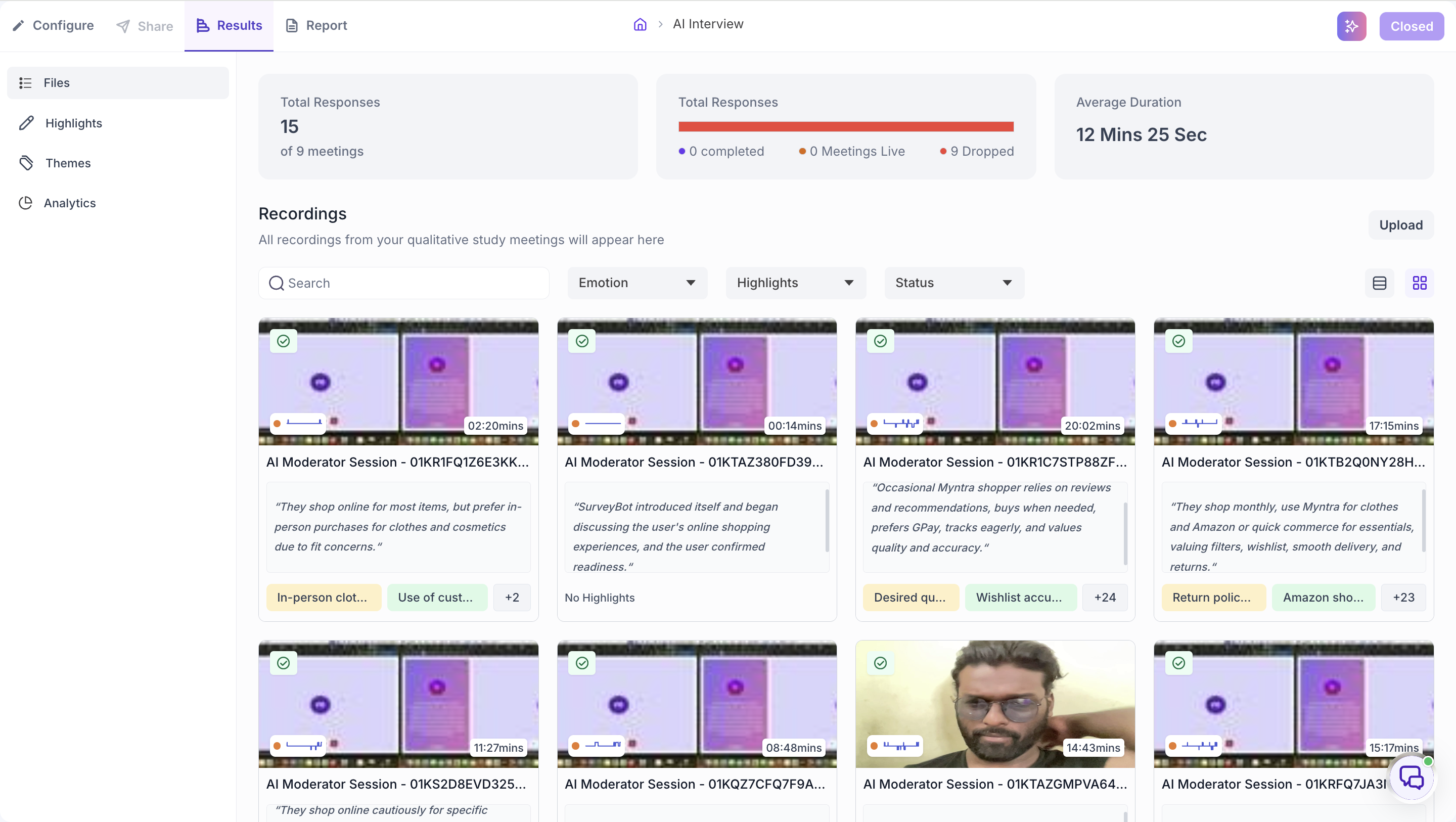
The redesigned Qualitative Results experience introduces a unified workspace across qualitative studies, media collections, and the Files Library, providing a consistent experience for reviewing interviews, uploaded recordings, and research assets.
The new experience includes Grid and List views, enhanced search and filtering capabilities, summary cards, improved session tracking, and richer AI-generated metadata such as themes, emotions, and tags. Researchers can quickly locate recordings, monitor processing status, review AI-generated insights, and manage large media repositories more efficiently.
Key Impact
- Delivers a modern, unified workspace for qualitative research and media analysis.
- Makes it easier to search, filter, and navigate interviews, recordings, and uploaded media.
- Provides greater visibility into AI-generated themes, emotions, tags, and processing status.
- Improves efficiency when managing large qualitative studies and media collections.
- Creates a more streamlined experience for reviewing and analyzing qualitative research.
2. Delete AI Reports
Overview
Researchers can now permanently delete AI-generated reports that are no longer required, making it easier to keep workspaces organized and manage generated reports.
What's Changed
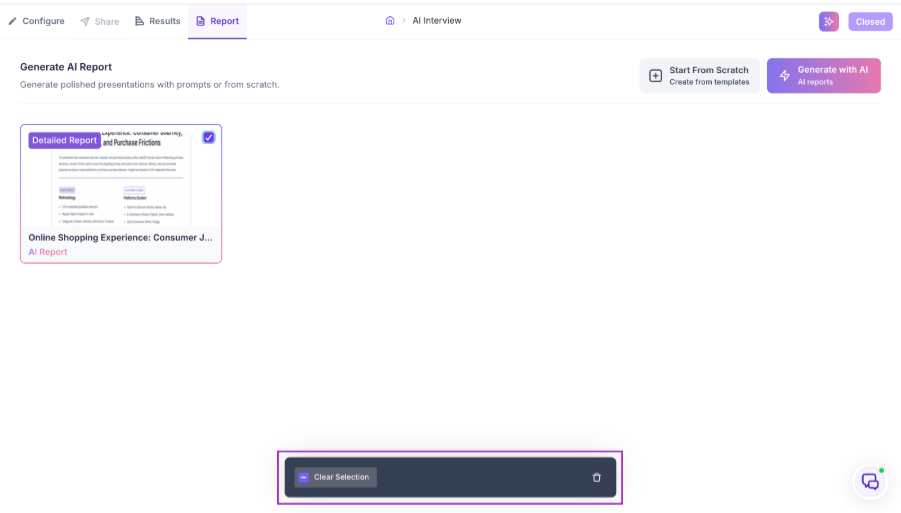
AI reports can now be deleted directly from both the report list and report details page. A confirmation dialog is displayed before permanently removing a report to help prevent accidental deletions.
Key Impact
- Simplifies AI report management.
- Helps reduce workspace clutter.
- Provides greater control over AI-generated reports.
Bug Fixes & Platform Improvements
1. AI Moderator Audio Stability Fix
AI Moderator | Interview Experience
Resolved an issue where AI Moderator audio could repeatedly play the same word or audio segment during interviews, resulting in smoother and more natural conversations.
2. AI Report Accuracy Improvements
AI Reports
Resolved an issue where AI reports could display incorrect participant counts, media counts, and session duration for qualitative studies and media collections.
3. Highlights Filter Support
Media Collections | Highlights
Added filtering support within the Highlights page for media collections, making it easier to locate and review manually created highlights.
4. Recording Indicator Fix
Qualitative Research | Media Processing
Resolved an issue where interview recordings could display an incorrect recording indicator while video processing was in progress.
5. Microsoft SSO Sign-Up Fix
Authentication
Resolved an issue that could prevent users from successfully signing up using Microsoft Single Sign-On (SSO).
6. Participant Validation Improvements
Live Interview | Study Builder
Improved validation for participant descriptions, providing clearer feedback when character limits are exceeded.
7. Demo Mode Speaker Label Protection
Demo Mode
Restricted editing of speaker labels for Demo Mode media to preserve demonstration data.
8. Workspace Invitation Confirmation
Workspace Management
Added a confirmation message after successfully inviting users to a workspace.
9. Study Approval Improvements
Approvals
Added full study name tooltips within the Approvals page, making it easier to distinguish studies with similar names.
10. A/B Test AOI Time Tracking Fix
A/B Testing | Analytics
Resolved inconsistencies in AOI time calculations for A/B Test studies to improve behavioural analytics accuracy.
11. Task Block Camera Workflow Fix
Task Studies
Resolved an issue where participant cameras could remain active after completing a Task Block.
12. Folder Search Improvements
Platform Navigation
Resolved an issue where folders could incorrectly appear within their own hierarchy during search.
13. Loading Experience Improvements
Platform UI
Improved loading states across FCET-supported blocks, Video Response studies, and A/B & Preference Test layouts to provide clearer visual feedback while content is loading.
14. Improved Ranking Question Results
Study Results | Ranking Questions
Improved the display of long answer options in Ranking question results, making responses easier to read and interpret.