
Release Notes - 26th August, 2026
This release brings a new enhancement to Prototype Testing, along with improvements across Qualitative Meetings, Quantitative Studies, AI Moderator, Journey Insights, media handling, and overall platform usability.
Key highlights include the ability to replace imported prototypes without rebuilding the Prototype Test block, improved Qualitative Meeting session and slot management, prevention of double booking and duplicate meeting sessions, more reliable media uploads and AI Moderator recording processing, improved Task Block Journey Insights, better Multiple Choice configuration and validation, UI improvements, and the removal of unused feature flags to simplify platform configuration.
1. Replace imported prototype links
Researchers can now replace the prototype link on an existing Prototype Test block without rebuilding the block from scratch.
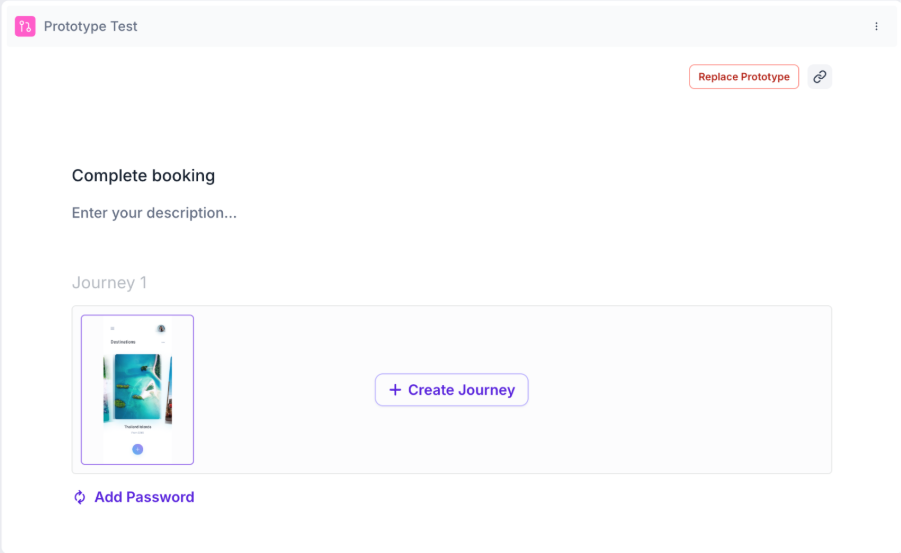
The new Replace Prototype option allows researchers to update the Figma prototype while retaining the block's existing title, description, and configuration settings.
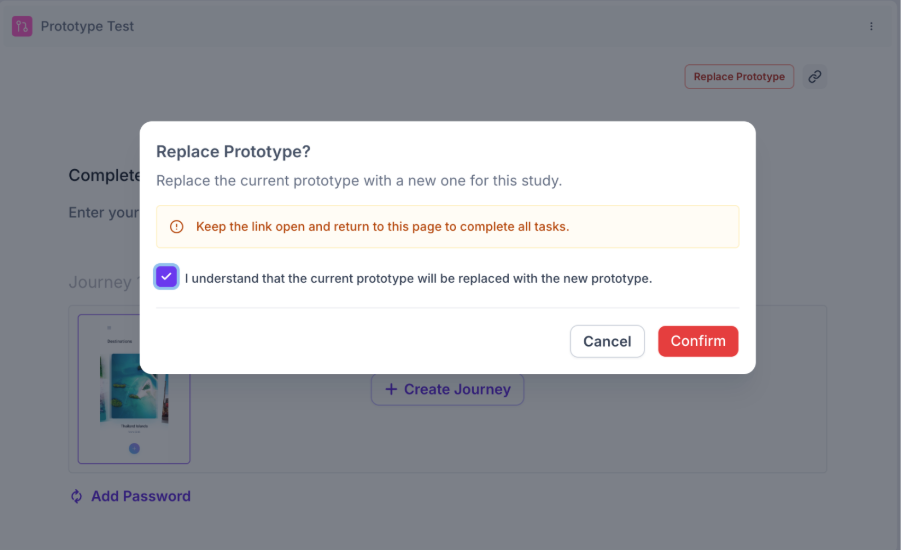
Benefit: Researchers can quickly switch to a new Figma file or prototype version without recreating the entire Prototype Test block, saving time and reducing configuration effort.
2. Fixed UI issue when closing a study
Previously, clicking Close Study caused the top section of the study page to shift when the confirmation popup appeared.
Fixed: The UI now remains properly aligned when the Close Study confirmation popup is displayed.
3. Duplicate choices are no longer allowed in Bulk Import
Previously, users could import the same choice multiple times into a Multiple Choice question using Bulk Import.
Fixed: Duplicate choices are now blocked, and users will see “Duplicate options are not allowed.”
4. Fixed session limits for Qualitative Meetings
Previously, Qualitative Meeting studies could allow more sessions to be scheduled than the limits configured by the study owner.
For example:
A study requiring 10 sessions could end up with more than 10 sessions.
If the daily limit was set to 10 sessions, an 11th session could still be booked.
Fixed: Configured study-level and daily session limits are now properly enforced.
5. Fixed "Upload Failed" when adding additional media
Previously, users could upload the first piece of media successfully in a G&R social media block, but would see an “Upload Failed” error when using Add Clip to upload additional media.
Fixed: Users can now add multiple media/creative clips successfully across supported social media blocks, including TikTok, Instagram, YouTube Shorts, LinkedIn, Facebook, and Douyin.
6. Fixed duplicate meeting sessions during participant scheduling
Previously, when two participants opened the same meeting scheduling link and selected the same time slot at nearly the same time, separate meeting sessions could be created instead of adding them to the same session.
Fixed: Meeting availability is now updated as participants select slots, preventing duplicate sessions and ensuring participants are correctly added to the same meeting where applicable.
7. Fixed missing time slots in Qualitative Meeting scheduling
Previously, some configured meeting slots were not displayed to participants, particularly when the availability window started at 12 AM. Meeting availability was also restricted to whole-hour intervals.
Fixed: Participants can now see all configured time slots, with support for more flexible 15-minute intervals.
8. Fixed double booking in 1:1 meetings
Previously, two participants could attempt to book the same 1:1 meeting slot at the same time, resulting in a booking conflict.
Fixed: Once a slot is booked, another participant can no longer successfully book the same slot. Availability is refreshed to reflect the latest booking.
9. Fixed duplicate recording processing in AI Moderator
Previously, the AI Moderator recording could be processed again when a user closed their browser after the recording had already finished processing. This could overwrite the existing recording data.
Fixed: Recording completion is now processed only once per session, preventing duplicate processing and protecting completed recording data.
10. Improved Task Block Journey Tree
Previously, the Journey Tree could show incomplete or incorrect journeys when combining results from multiple testers. Screens could be missing, repeated screens could create artificial branches, and loading insights could become slower as the number of testers increased.
Fixed: Journey Trees are now more accurate and consistent across testers, with improved handling of revisited screens and better performance for studies with larger numbers of testers.
11. Fixed "Add Choice" button behavior in Multiple Choice
Previously, the Add Choice button in a Multiple Choice block could appear disabled/greyed out but would still work when clicked.
Fixed: The button's appearance now correctly matches its functionality, so users can clearly tell when the action is available.
12. Removed unused feature flags
Removed feature flags that were no longer being used across the platform, simplifying configuration and improving overall platform maintainability.