
Release Notes - 14th October
This release introduces improvements to respondent access for screen-sharing studies, persona-specific attention metrics in AI Creative Insights, and data export capabilities in Media Analytics. These enhancements help improve study accessibility, provide more consistent audience-specific creative insights, and make analytics data easier to access and use.
New Features & Enhancements
1. Mobile App Guidance for Task and Prototype Testing
Product Area: Study Management | Respondent Experience
Studies containing Task or Prototype Testing blocks now guide respondents using mobile browsers to continue their study in the Decode app.
What’s new
Mobile app guidance: Respondents opening these studies in a mobile browser see instructions to continue in the Decode app, with the appropriate app store link for their device.
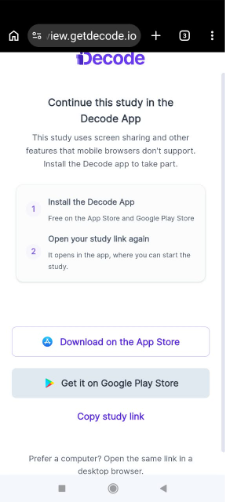
Easy study access: Respondents can copy the study link and reopen it in the app.
Researcher warnings: Warnings appear before publishing and when sharing study links, highlighting studies that require the app.
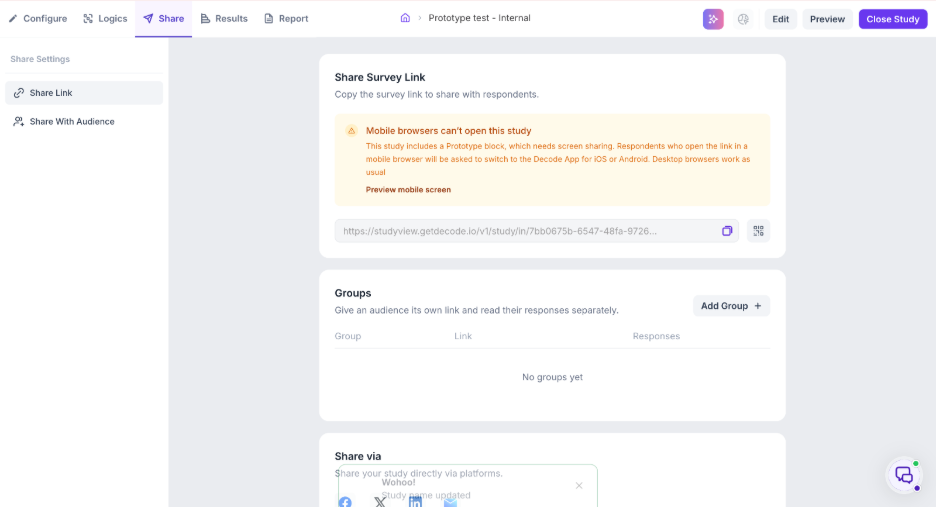
Desktop compatibility: Studies continue to work as usual in desktop browsers, and studies without the specified blocks remain unaffected.
Why it matters
This enhancement helps prevent respondents from attempting to complete screen-sharing studies in unsupported mobile browsers, reducing compatibility issues and potential drop-offs during study participation.
2. Persona-Specific AOI Metrics in AI Creative Insights
Product Area: AI Creative Insights | Audience Analysis
AOI (Area of Interest) metrics now reflect the selected audience persona’s predicted gaze, ensuring that attention metrics align with the persona-specific heatmap.
What’s new
- Persona-specific metrics: AOI metrics update automatically when users switch personas.
- Shared AOI definitions: AOI definitions are shared across personas, eliminating the need to redraw them for each audience.
- Consistent updates: Adding, editing, or deleting an AOI updates the corresponding results across applicable personas.
- Audience comparison: AOI metrics can be compared across personas in the Audience Comparison view.
- Clearer results: Persona-specific labels and loading and error states help users identify the data being displayed.
Why it matters
Marketers can better understand how different audience personas are predicted to engage with specific creative elements. By aligning AOI metrics with persona-specific heatmaps, this enhancement provides more consistent insights for evaluating creative performance and comparing audience attention patterns.
3. Download CSV for Media Analytics
Product Area: Media Analytics | Data Export
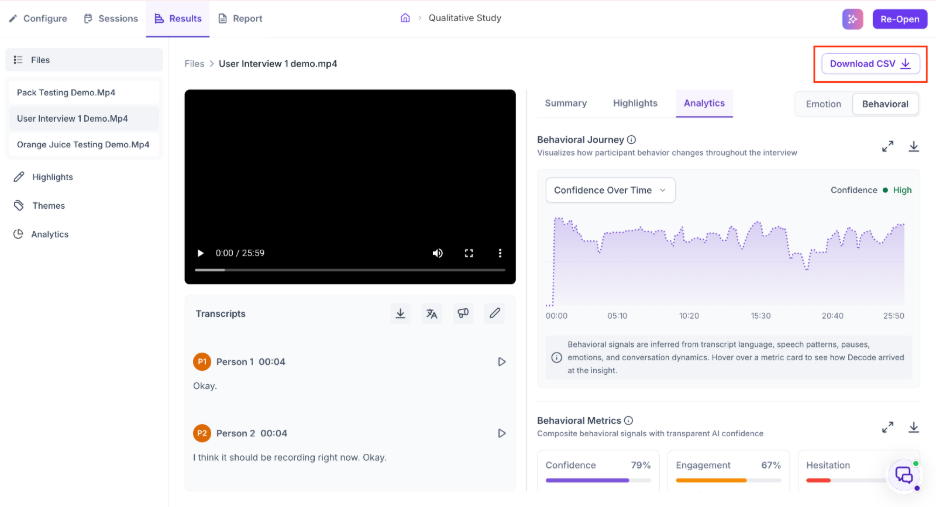
Users can now download the underlying analytics data for an individual media item directly from the Analytics panel.
What’s new
- One-click export: A new Download CSV button exports all seven available analytics datasets into a single file.
- Comprehensive data: The export includes Emotional Journey, Emotion Metrics, Speaker Phase Metrics, Behavioral Journey, Behavioral Metrics, Conversation Dynamics, and Communication Style.
- Download confirmation: Users receive an on-screen confirmation showing the exported file name and row count.
- Retry support: If analytics are unavailable or an export fails, an explanatory message appears with an option to retry.
- Existing exports unchanged: Per-chart PNG downloads and branded PDF reports continue to work as before.
Why it matters
This feature makes media analytics data more accessible for further analysis, reporting, and spreadsheet-based workflows. Users can work directly with the underlying metrics instead of relying solely on visual charts or PDF reports.