
Release Notes - 30th July, 2026
This release introduces major enhancements across AI Creative Insights, Synthetic Audience Management, MCP Integration, Platform Experience, and Security.
Key highlights include the introduction of a centralized Synthetic Audience Manager for creating reusable synthetic audiences and personas, Audience-Based AI Creative Insights that deliver audience-specific creative predictions and comparisons, Decode MCP Server Integration for AI assistants, several UI & UX improvements across the platform, and enhanced OpenAI API security through backend integration.
1. Synthetic Audience Manager for AI Creative Insights
Overview
Decode now introduces Synthetic Audience Manager, a centralized workspace for creating, organizing, and managing reusable synthetic audiences for AI Creative Insights. Researchers can build audience libraries, create multiple personas within an audience, and reuse audience definitions across creative evaluations, reducing repetitive setup while ensuring consistency across projects.
What's Changed
Centralized Audience Library
Researchers can now manage all synthetic audiences from a dedicated Audience Manager, providing a single location to create, organize, and maintain reusable audiences for different brands, markets, products, and research objectives.
Instead of recreating audiences for every evaluation, teams can maintain a structured audience library that can be reused across multiple AI Creative studies, ensuring consistency while reducing setup effort.
Audience Creation
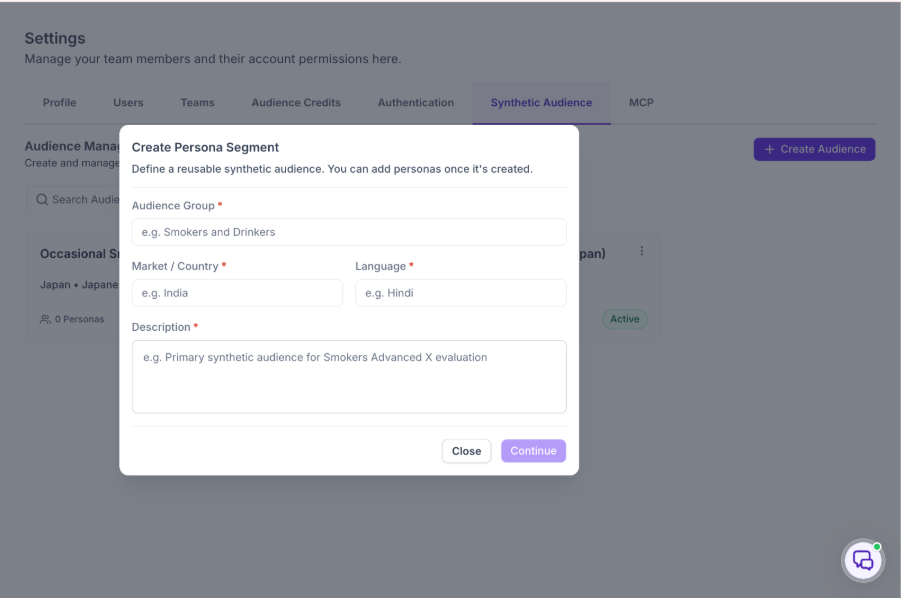
Creating synthetic audiences is now a guided experience that enables researchers to quickly define reusable audience groups for AI Creative evaluations.
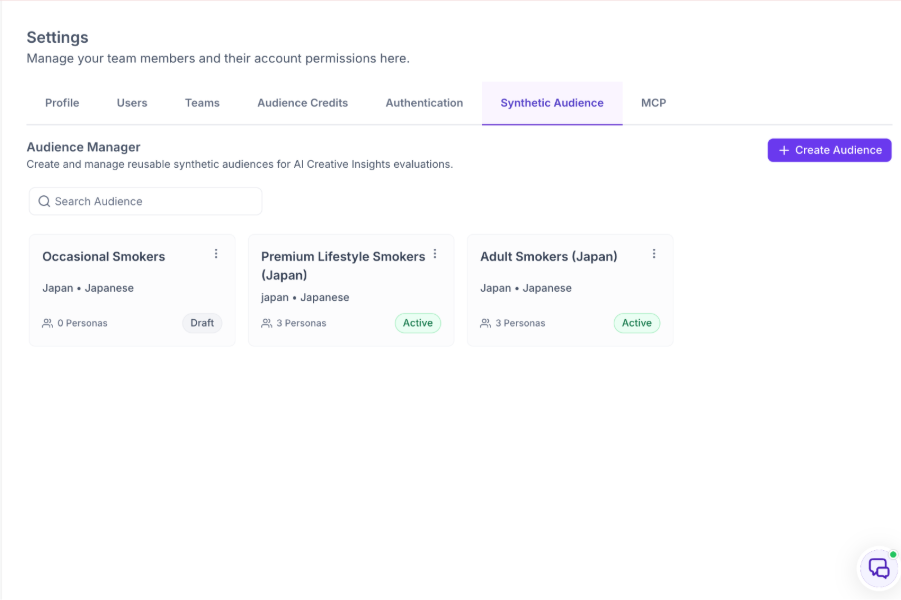
Researchers can configure audience details such as market, language, and supporting information, making it easier to organize audiences for different research objectives while maintaining a structured audience library.
Persona Management
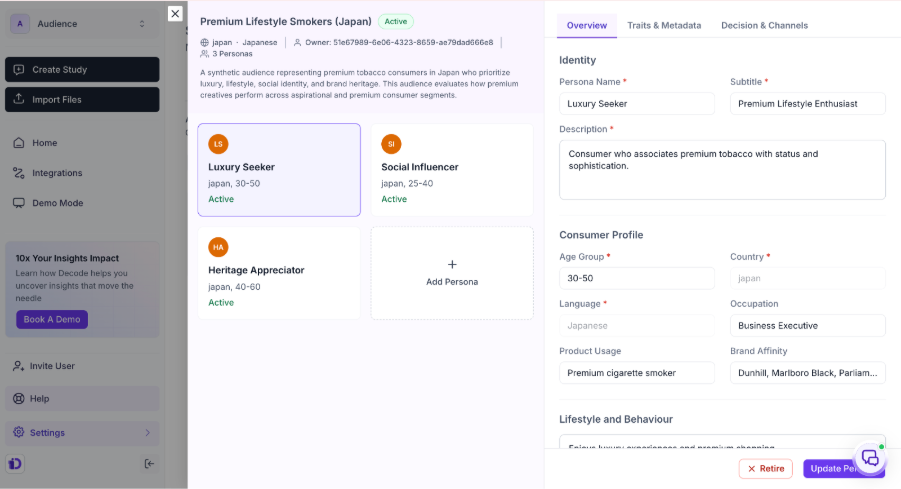
Each synthetic audience can contain multiple personas, allowing researchers to represent different customer segments within a single audience.
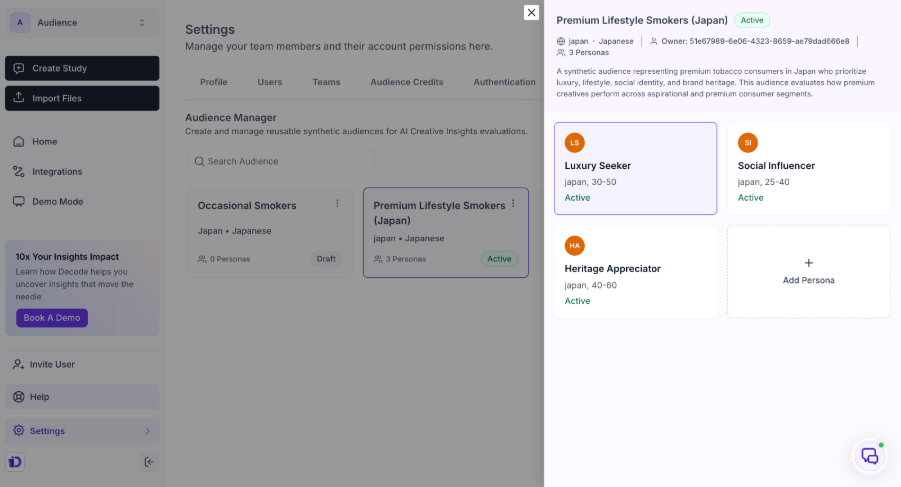
Researchers can create and manage personas independently, enabling richer audience modelling while keeping related personas grouped under a common audience. This provides greater flexibility when evaluating creatives across diverse customer segments.
Audience Lifecycle Management
Audience Manager introduces lifecycle management to help teams organize reusable audiences throughout their lifecycle.
Researchers can maintain audiences using Draft, Active, and Retired states, making it easier to distinguish work-in-progress audiences from those that are ready for evaluation while keeping audience libraries organized over time.
Streamlined Audience Management
The overall audience management experience has been redesigned to simplify day-to-day administration.
Researchers can browse audience libraries, search existing audiences, edit audience details, manage personas, and remove audiences directly from a single workspace. These improvements make audience maintenance more efficient while reducing the effort required to manage growing audience libraries.
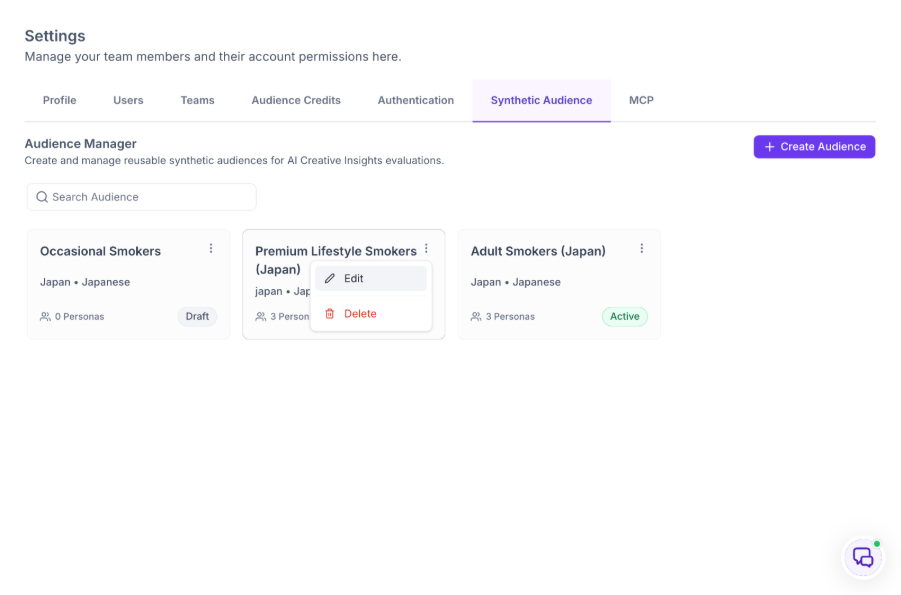
Reusable Audience Framework
By centralizing audience creation and management, Synthetic Audience Manager establishes a consistent framework for AI Creative Insights.
Reusable audience definitions can now be applied across multiple creative evaluations, helping research teams standardize audience modelling, improve collaboration, and accelerate creative evaluation workflows.
Key Impact
- Introduces a centralized library for reusable synthetic audiences.
- Enables multiple personas within a single audience.
- Simplifies audience creation, organization, and management.
- Supports structured audience lifecycle management.
- Reduces repetitive audience setup across AI Creative evaluations.
- Establishes a reusable audience framework for future evaluations.
2. Audience-Based AI Creative Insights
Overview
Decode now enhances AI Creative Insights with Audience-Based Creative Evaluation, enabling researchers to evaluate creatives from the perspective of selected synthetic audiences. By combining reusable synthetic audiences with AI-powered creative analysis, researchers can understand how different audience segments are predicted to respond, explore persona-level insights, compare audience performance, and make more informed creative decisions before launching campaigns.
What's Changed
Audience-Aware Creative Evaluation
Researchers can now select an existing synthetic audience or create a new audience while uploading creatives for AI Creative evaluation. Once selected, the audience is carried throughout the evaluation workflow, ensuring that AI-generated insights are tailored to the intended audience rather than providing a generalized assessment.
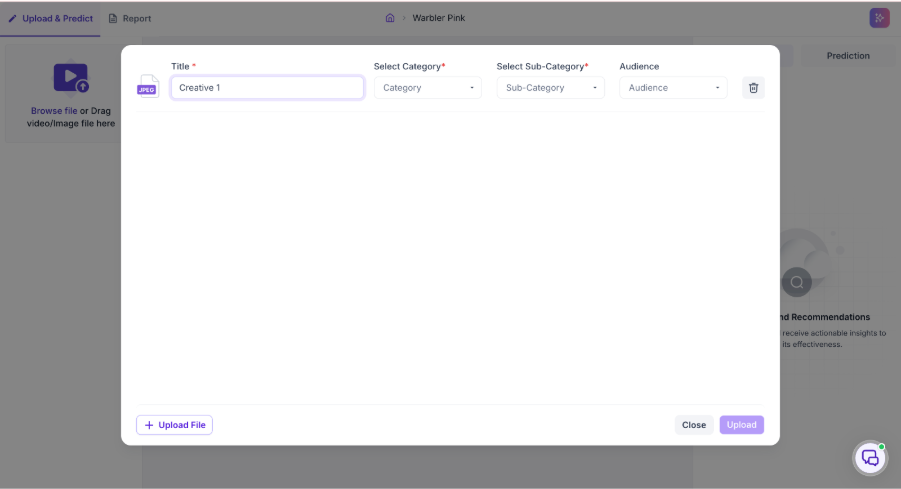
This creates a consistent evaluation experience where every insight, recommendation, and prediction is generated in the context of the selected audience.
Audience Overview
AI Creative Insights now begin with a dedicated Audience Overview, providing a high-level summary of creative performance for the selected audience.
The overview highlights key information including the selected audience, number of personas evaluated, overall Audience Fit Score, highest and lowest performing personas, and an AI-generated summary explaining the predicted audience response. This gives researchers and stakeholders an immediate understanding of overall creative performance before exploring detailed insights.
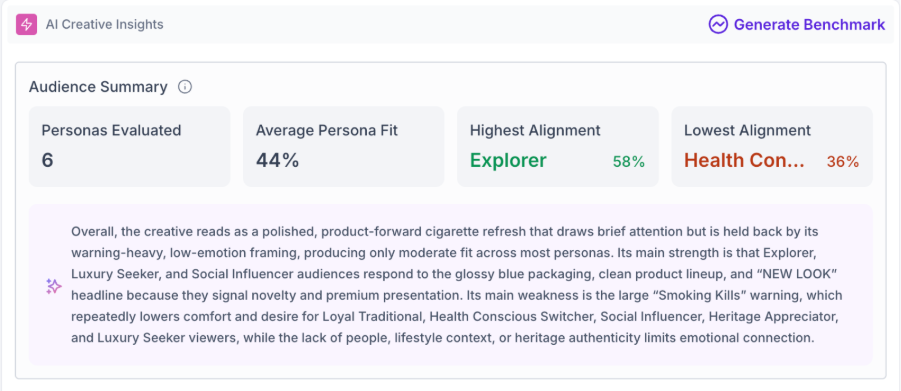
Persona-Level Creative Insights
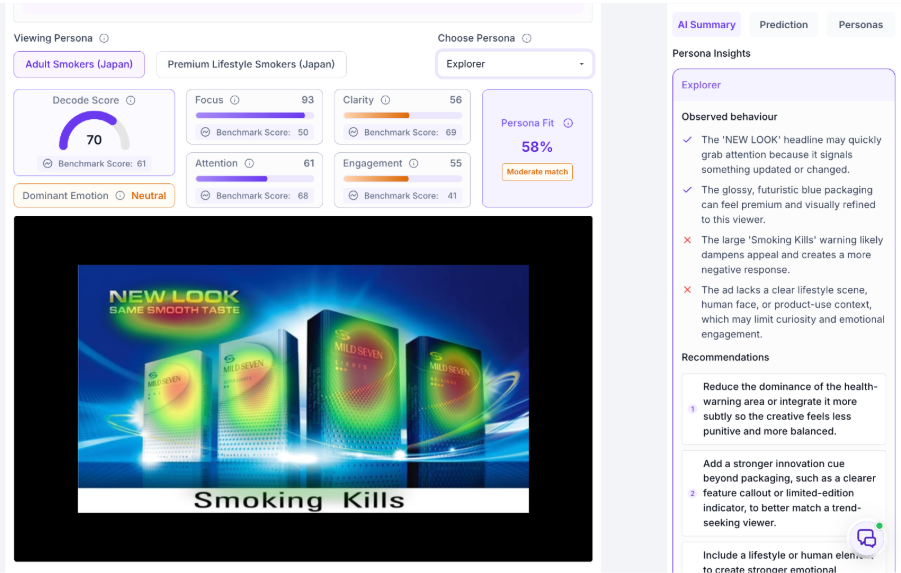
Researchers can now drill down into individual personas to understand how each audience segment is predicted to respond to the creative.
Each persona includes detailed AI-generated observations, Audience Fit, predicted strengths, areas of concern, and recommendations. These insights help researchers identify how creative messaging resonates across different customer segments and uncover opportunities for optimization.
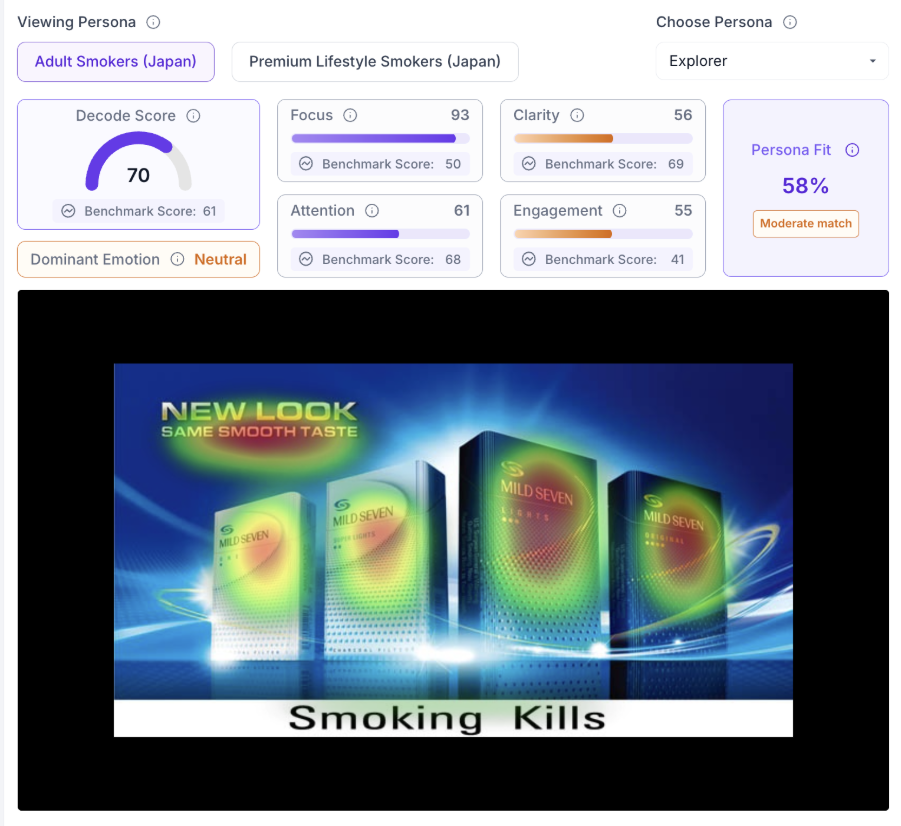
Audience Comparison
A dedicated Audience Comparison experience allows researchers to compare how multiple synthetic audiences are predicted to respond to the same creative.
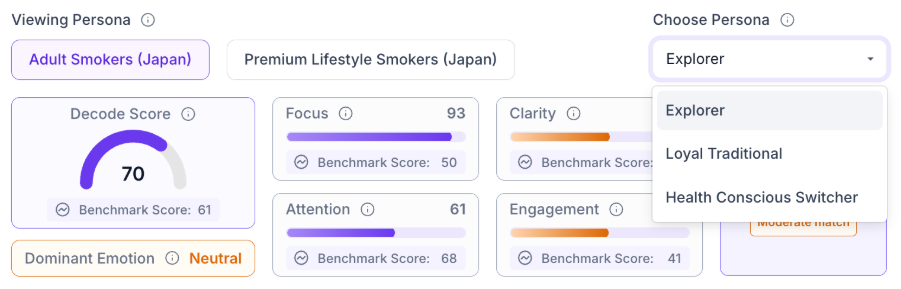
Comparison views include key AI Creative metrics such as Decode Score, Audience Fit, Attention, Engagement, Clarity, and other supporting insights, enabling teams to quickly identify the most suitable audience for a campaign and make more confident targeting decisions.
Actionable Recommendations
Beyond highlighting audience performance, AI Creative Insights now provide audience-specific recommendations that explain why a creative performs well for particular audience segments and where improvements can be made.
These recommendations help researchers refine creative messaging, strengthen audience alignment, and make more informed optimization decisions before moving into the next stage of research.
Connected Research Workflow
The AI Creative Insights now provides a seamless transition into the next stage of research by allowing researchers to launch a Decode study directly from the report.
The selected synthetic audience is automatically carried into the study creation workflow, reducing manual configuration and creating a more connected experience between AI Creative evaluation and research execution.
Key Impact
- Introduces audience-aware AI Creative evaluation.
- Delivers AI insights tailored to selected synthetic audiences.
- Provides executive summaries and persona-level creative insights.
- Enables comparison across multiple synthetic audiences.
- Offers actionable recommendations for creative optimization.
- Creates a seamless workflow from AI Creative evaluation to study creation.
3. Decode MCP Server Integration
Overview
Decode now supports Model Context Protocol (MCP), enabling secure integration with MCP-compatible AI assistants. Researchers can access Decode studies and insights directly from supported AI tools, creating a more connected and efficient research workflow.
What's Changed
AI Assistant Integration
Researchers can now connect Decode with MCP-compatible AI assistants to interact with their research using natural language. This makes it easier to access study information and insights without switching between multiple applications.
Study & Insight Access
AI assistants can securely retrieve study details, participant responses, highlights, summaries, and AI-generated insights from Decode, enabling researchers to quickly explore and analyze research findings.
Study Management
Researchers can also perform common study actions through supported AI assistants, including creating studies, retrieving study information, monitoring progress, and generating reports.
Secure Integration
The MCP Server securely handles communication between Decode and AI assistants, ensuring authenticated and controlled access to research data.
Key Impact
- Enables Decode integration with MCP-compatible AI assistants.
- Simplifies access to studies and research insights.
- Supports AI-assisted study management.
- Reduces context switching between research and AI tools.
- Provides secure access to Decode data.
4. UI & UX Enhancements
Overview
This release includes several UI and UX improvements across Decode to deliver a more intuitive, consistent, and seamless user experience. These enhancements refine platform navigation, improve usability, and streamline everyday research workflows.
What's Changed
Improvements have been made across multiple areas of the platform, including AI Analytics, Dashboard, Study Creation, Study Results, Prototype Testing, AI Themes, Highlights, and Demo Mode.
The updates focus on improving layouts, navigation, responsiveness, and overall consistency, making it easier for researchers to navigate the platform and complete common tasks efficiently.
Key Impact
- Improves overall usability across Decode.
- Delivers a more consistent user experience.
- Simplifies navigation across key research workflows.
- Enhances the overall look and feel of the platform.
5. Secure OpenAI API Integration
Overview
To enhance platform security and reliability, Decode now routes all AI requests through a secure backend service.
What's Changed
AI requests are now securely processed through Decode's backend, improving request handling while ensuring API credentials remain protected. This enhancement provides a more secure and reliable foundation for AI-powered capabilities across the platform.
Key Impact
- Strengthens platform security.
- Protects AI service credentials.
- Improves the reliability of AI-powered features.
- Provides a secure foundation for future AI enhancements.
Performance Enhancements
1. Create Study Performance Optimization
Overview
Improved the performance of the study creation workflow to deliver a faster and more responsive experience.
What's Changed
Optimized the study creation process by improving backend processing and application performance while maintaining existing functionality and data integrity. Additional monitoring has also been introduced to better track study creation performance.
Key Impact
- Faster study creation experience.
- Improved platform responsiveness.
- Maintains existing functionality and data integrity.
- Enhanced performance monitoring.
Bug Fixes & Platform Improvements
1. Study Publishing from Logic Tab
Overview
Resolved an issue that prevented studies from being published directly from the Logic tab.
Issue Resolved
Studies can now be published successfully from both the Logic and Configure tabs without encountering publishing interruptions.
Impact
- Enables seamless publishing from the Logic tab.
- Improves the study creation experience.
2. Card Sort Results UI Improvements
Overview
Improved the Card Sort results interface for better visual consistency.
Issue Resolved
Fixed UI alignment and padding issues in the score display caused by an unintended component appearing in the results.
Impact
- Improves the readability of Card Sort results.
- Ensures a consistent and properly aligned score display.
3. Improved Tonality Processing for Media Without Audio
Overview
Enhanced Katana Tonality processing for media files without audio.
Issue Resolved
Media uploads without audio are now handled correctly, allowing Speech-to-Text and Tonality processing to complete successfully without unnecessary failures.
Impact
- Improves processing reliability.
- Eliminates failures for media files without audio.
4. Improved Answer Piping Experience
Overview
Enhanced answer piping to provide greater flexibility when configuring survey questions.
Issue Resolved
Users can now manage answer options more effectively when using piped responses, enabling smoother survey flows and reducing unnecessary default options.
Impact
- Simplifies survey design.
- Improves flexibility when using answer piping.
5. Quota Label Correction
Overview
Corrected a terminology issue in the Group & Randomization block.
Issue Resolved
Fixed a spelling error in the Quota label.
Impact
- Improves UI consistency.
- Ensures accurate terminology across the platform.
6. Screen Out Page Logic Controls
Overview
Updated the Logic configuration experience for Quantitative Studies.
Issue Resolved
Removed the Add Logic option from the Screen Out Page, ensuring logic controls are available only where supported.
Impact
- Prevents unsupported logic configuration.
- Improves consistency within the Logic builder.
7. Demo Mode Study Management
Overview
Improved study management restrictions in Demo Mode.
Issue Resolved
Users can no longer reopen studies while using Demo Mode, aligning the experience with expected platform behavior.
Impact
- Enforces Demo Mode restrictions.
- Prevents unintended study actions.