
Release Notes - 29th September
This release includes enhancements across Task Research, Study Management, AI Reports, Live Website Testing, and Study Results. We’ve also addressed key issues affecting task flows, tester completion status, and the Task block authoring experience.
New Features / Enhancements
1. Video Tooltip Guide for Live Website Testing
Live Website Testing | Participant Experience
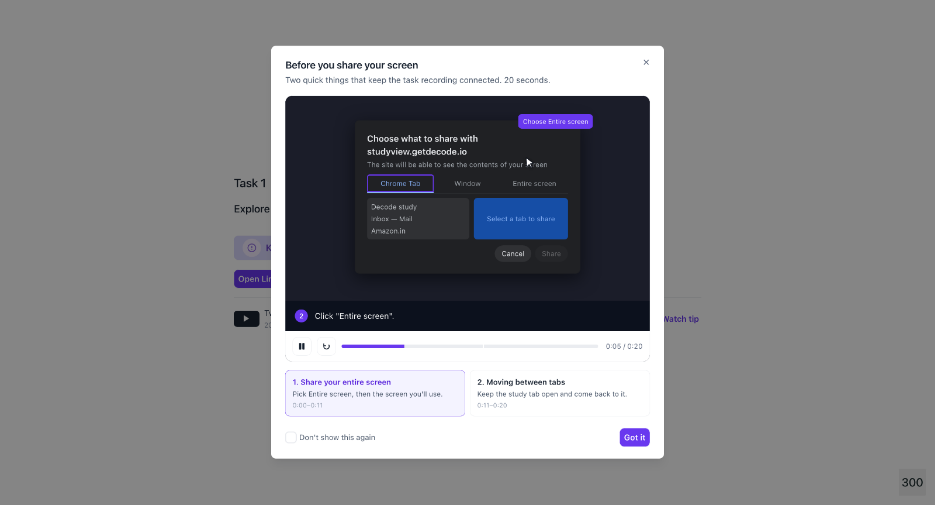
A new video tooltip guide is now available during Live Website Testing to help participants understand how to share their screen and switch between browser tabs while keeping their recording active.
What you can do
Participants can access the video guide directly from the screen-sharing prompt to learn how to:
- Grant browser permissions and share their screen.
- Switch between tabs during active website testing while keeping the recording intact.
- Use video controls to play, pause, replay, or close the guide.
Why it matters
The guided experience helps participants understand the screen-sharing and tab-switching workflow, reducing confusion during testing and helping ensure sessions are recorded correctly.
2. Configurable AI Report Providers
AI report generation now supports configurable report providers, allowing teams to choose the appropriate provider based on the requirements of a particular workspace or client.
What you can do
- Use Gamma as the default AI report-generation provider, with reports available for PDF download.
- Configure Faces.app as an alternative provider when PowerPoint (PPT) output is required.
- Select the appropriate AI report provider for a specific workspace or client through backend configuration.
- Apply different providers across workspaces or clients based on their reporting requirements.
Why it matters
Organizations can now tailor AI report generation to the needs of individual workspaces or clients. For example, teams can use Gamma for PDF-based reports or configure Faces.app when PowerPoint reports are required, providing greater flexibility in report delivery and output formats.
3. Study Groups: Share One Study with Multiple Audiences
Study Management | Share & Results
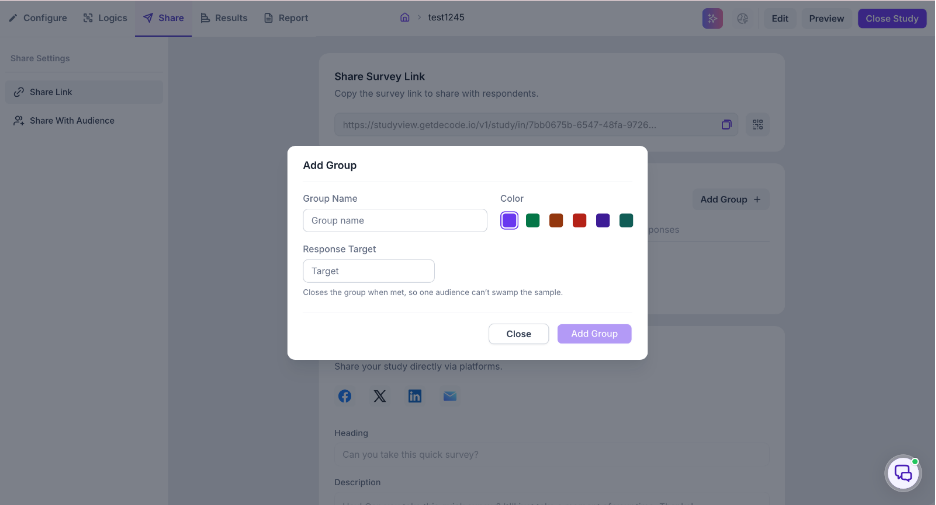
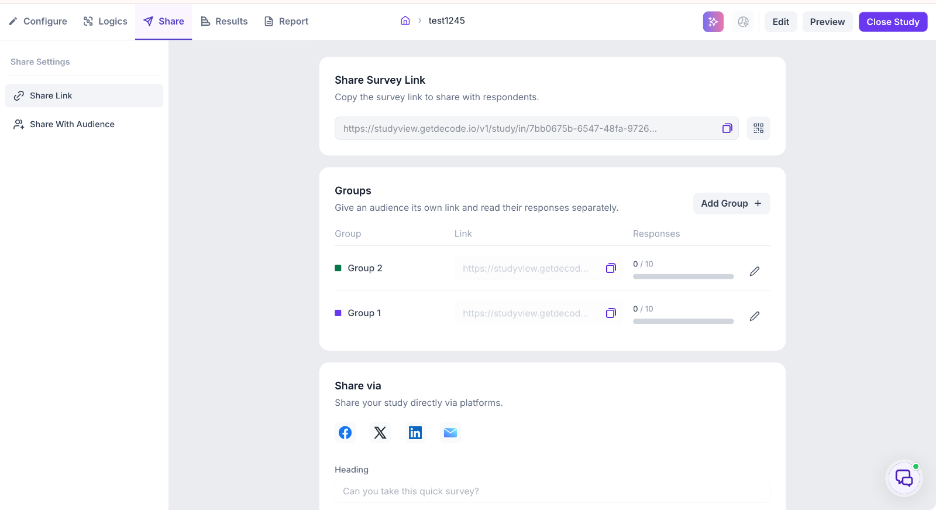
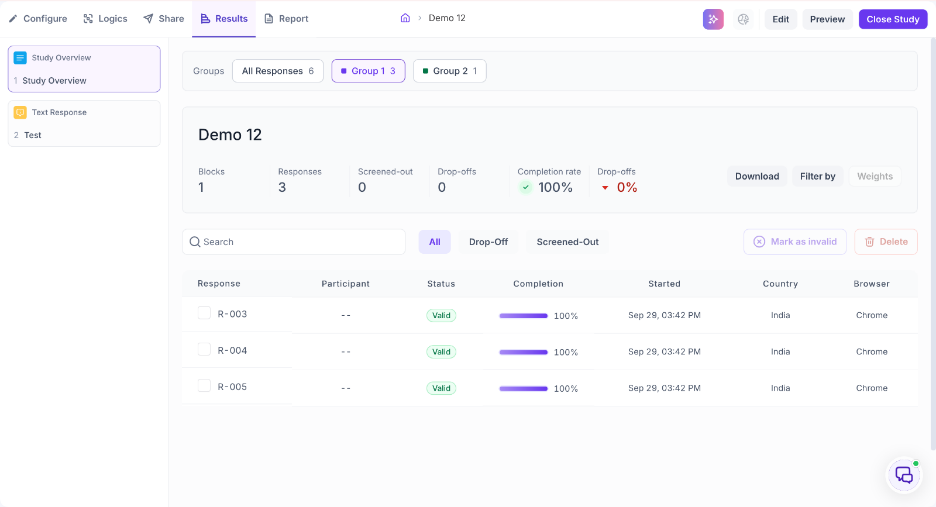
Researchers can now create multiple audience groups within a single study, allowing the same study to be shared with different audiences while keeping their responses segmented.
What you can do
Create groups directly from the existing Share Survey Link experience. Each group can have its own:
- Shareable study link.
- Name and colour.
- Response target.
Responses submitted through the default study link are assigned to Ungrouped, while responses submitted through a group link are permanently associated with that group.
Results segmentation
Study Overview now supports group-based segmentation, allowing researchers to:
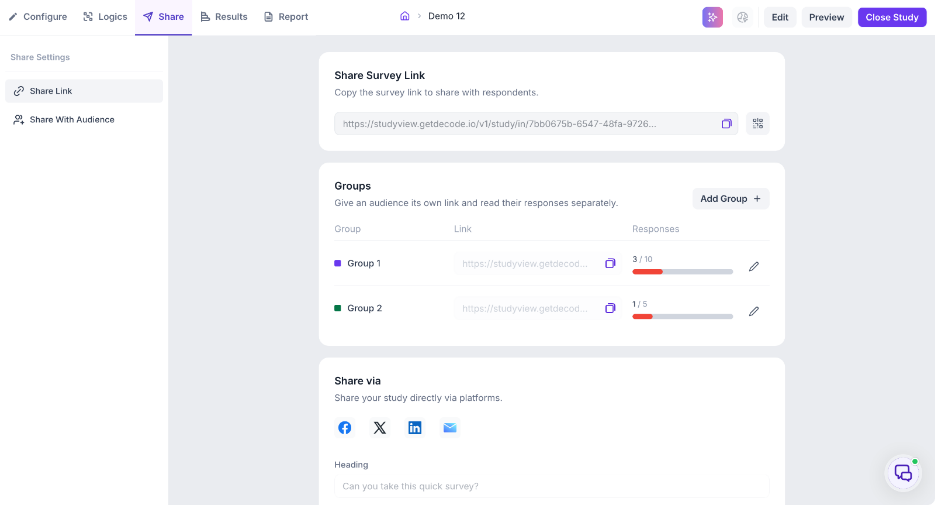
- View all responses or select a specific group.
- Scope study statistics to a selected audience.
- See each response's group directly in the response table.
- Filter responses by group.
- Search and select groups when a study contains many audiences.
Why it matters
Researchers can send one study to multiple client teams, regions, cohorts, or audiences without duplicating the study. Results remain organized within the same study while still allowing each audience's responses to be reviewed separately.
4. AI Moderator - Link-Based Stimuli for Prototype and Live Website Testing
AI Moderator | Stimuli & Participant Experience
Researchers can now attach prototype URLs or live website links directly to AI moderator goals, enabling interactive prototype testing and live-site usability tasks without relying on static screenshots or uploaded assets.
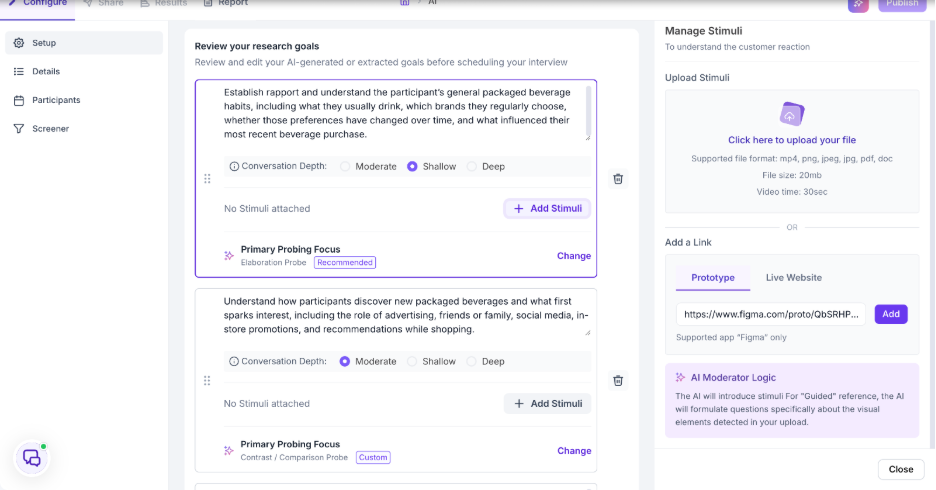
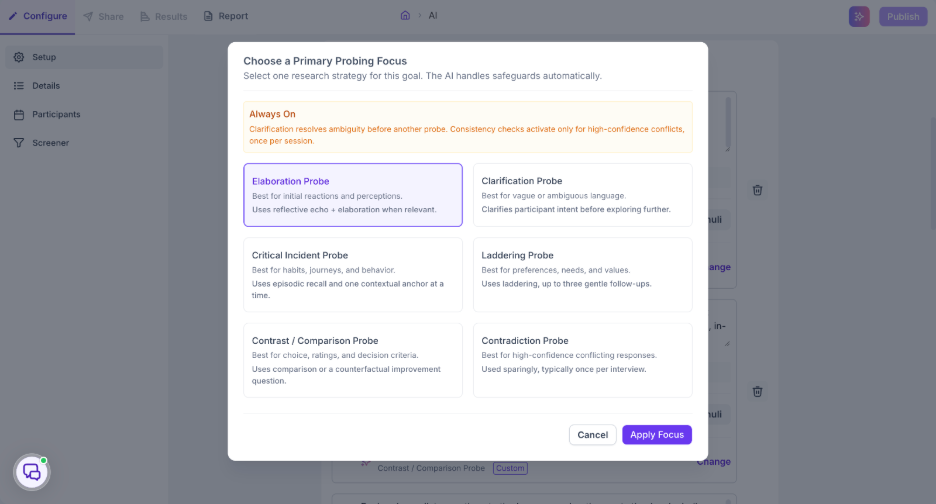
Each goal also includes a Primary Probing Focus, which is automatically recommended based on the goal and can be changed to another research strategy when needed.
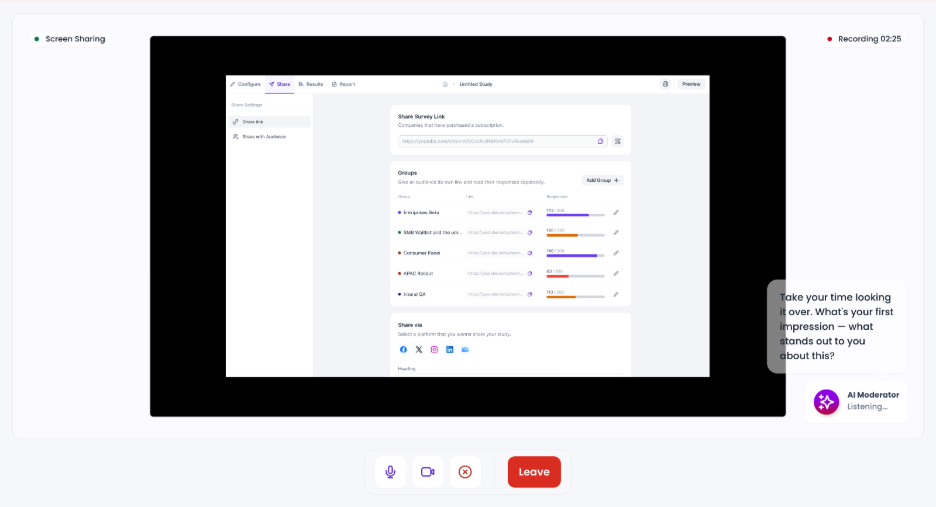
During the session, participants are prompted to share their screen based on the configured setting. The attached prototype or live website then opens in the participant’s browser, allowing them to interact directly with the experience and complete the assigned task while the AI moderator guides the conversation.
What you can do
Add links through the existing Manage Stimuli panel and:
- Select the link type as Prototype or Live website.
- Add and validate the URL before attaching it to the goal.
- Configure whether participants should share their screen while using the link.
- Attach multiple links to the same goal, including both a live website and a prototype.
- Review the AI-recommended Primary Probing Focus for each goal.
- Change the probing focus when a different research strategy is more appropriate for the goal.
Why it matters
Researchers can now use interactive websites and prototypes as stimuli for AI-moderated research instead of relying only on static assets. Multiple links can be added to the same goal, allowing participants to interact with both a live website and a prototype as part of the same research experience. The configurable Primary Probing Focus also gives researchers more control over how the AI moderator explores each goal.
Bug Fixes
1. Fixed Tester Status Being Marked as Aborted After Completing a Study
Task Research | Participant Experience
Resolved an issue where closing the Thank You page using Cmd + W (or Ctrl + W on Windows) after completing a study could incorrectly trigger the abort event.
Completed testers now remain marked as Completed, and the Task block retains the correct completion percentage after the Thank You page is closed.
2. Fixed Feedback Scale Reappearing Between Multiple Task Blocks
Task Research | Participant Experience
Resolved an issue where the Feedback scale from a completed Task block could incorrectly appear again when navigating to a subsequent Task block.
When a study contains multiple Task blocks, participants now proceed to the next configured Task after completing the previous Task and submitting its feedback.
3. Fixed Task Editor Overflow and Clipped Content
Task Research | Study Builder
Resolved a layout issue where the Task editor could extend beyond its container at common viewport widths, causing Task titles, descriptions, URLs, and other content to become clipped.
The Task editor now provides a more usable authoring experience without unexpectedly shifting the block horizontally when a field receives focus.
Release Summary
This release improves the Task Research experience for both researchers and participants, introduces flexible audience segmentation through Study Groups, expands AI report provider configuration, and adds guidance for Like Website Testing participants. It also resolves several issues affecting task completion, feedback flows, and Task block authoring.