
Release Notes - 10th July, 2026
This release introduces enhancements across Diary Studies, Quant Copilot, AI-Moderated Interviews, account access, study exports, and overall platform usability and stability.
Key highlights include the introduction of Activity Groups for creating and managing scheduled Diary Studies, a dedicated results experience for analyzing overall study and activity-level performance, expanded Quant Copilot support for Video Response data, improved reliability for Mouse Tracking and Area of Interest queries, Active Stimuli support for AI-Moderated Interviews, and several workflow and platform stability improvements across Decode.
🚀 Major Feature Enhancements
1. Activity Groups & Results Experience for Diary Studies
Overview
Decode now introduces Activity Groups, a new framework designed to support scheduled and multi-stage research experiences, with Diary Studies as the first implementation.
Unlike traditional studies where participants complete the entire study in a single session, Diary Studies allow researchers to engage with participants across multiple days or weeks. Researchers can create scheduled activities to capture participant experiences, behaviours, and opinions as they evolve over time.
Activity Groups provide an end-to-end framework for setting up, scheduling, sharing, and analyzing these multi-stage research experiences directly within Decode.
What’s Changed
Diary Study Setup & Activity Configuration
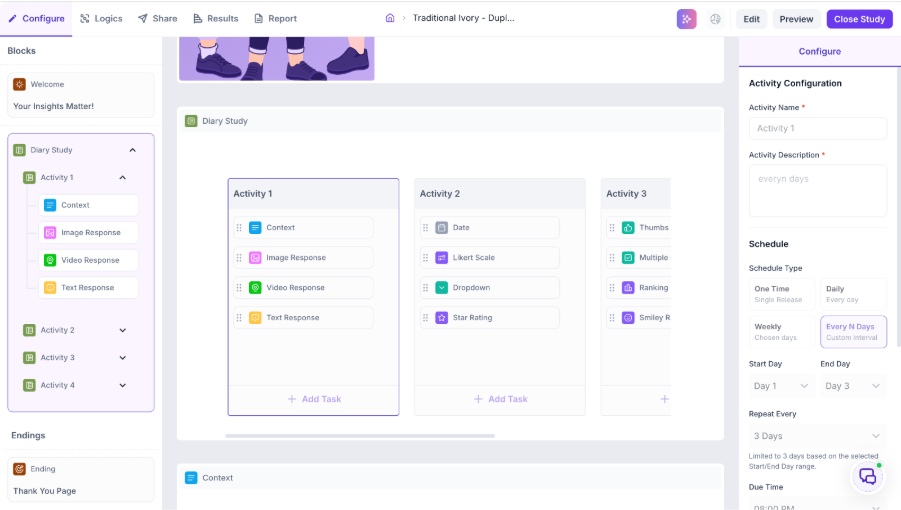
Researchers can now create multiple Activity Groups within a Diary Study, with each Activity Group representing a specific stage or milestone in the participant journey. For example, a 14-day product usage study could include activities for Day 1 Initial Impressions, Day 7 Product Usage Experience, and Day 14 Final Reflections.
Each Activity Group can contain one or more existing Decode blocks as tasks, allowing researchers to combine Video Response, Image Response, Text Response, Multiple Choice, Likert Scale, Ranking, and other available research blocks based on their research requirements.
Researchers can configure how and when each activity should be completed using recurrence options such as One Time, Daily, Weekly, and Every N Days. Additional configurations include activity duration, recurrence intervals, due times, required entries, and late submission preferences.
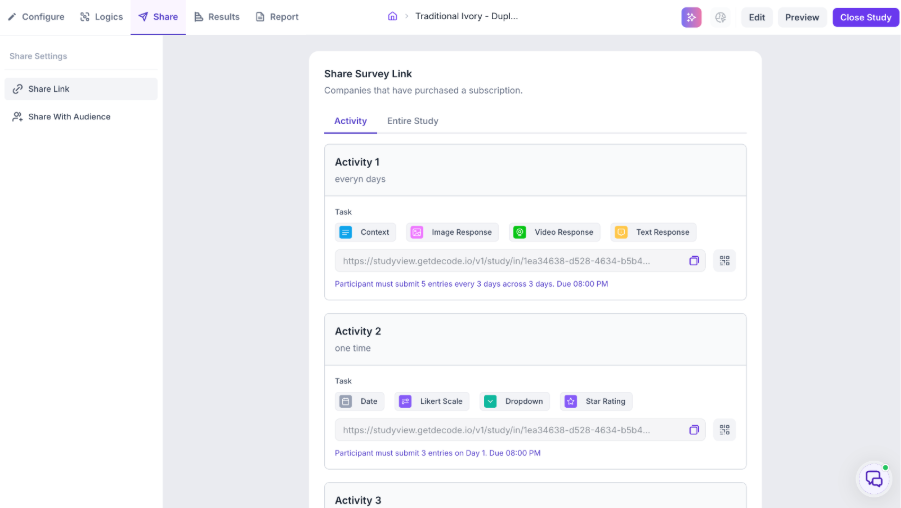
The Share experience has also been enhanced to support Diary Studies. Researchers can share individual activities using dedicated participation links and QR codes or share the Entire Study, allowing participants to progress through activities based on the configured schedule and availability.
Diary Study Results Experience
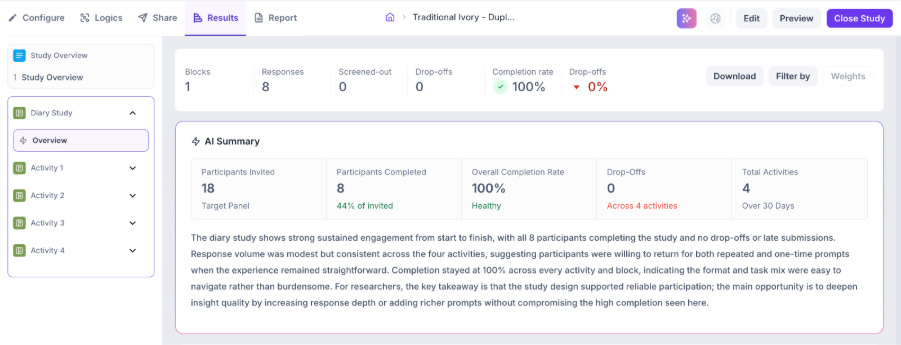
The Results experience provides researchers with a consolidated view of participant engagement and performance across the entire Diary Study.
A dedicated Diary Study Overview displays key study-level metrics, including participants invited, participants completed, overall completion rate, drop-offs, and total activities. An AI-generated summary provides a quick interpretation of overall participation and study performance.
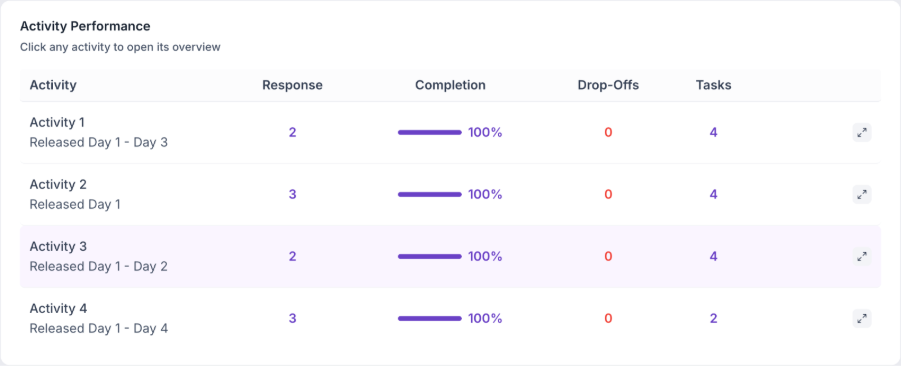
The Activity Performance section enables researchers to compare responses, completion rates, drop-offs, number of tasks, and scheduled release periods across all activities. This makes it easier to understand participant engagement at different stages of the study and identify activities where participation increased or declined.
Researchers can further explore individual Activity Groups to review detailed activity and task-level performance. Each activity provides an overview of responses, completion rates, drop-offs, and total tasks, while the View Result option allows researchers to navigate directly to the detailed results of individual tasks for further analysis.
Together, the Diary Study Overview, Activity Performance, and detailed task results provide a layered analysis experience, allowing researchers to move from overall study performance to individual activity and task-level insights.
Key Impact
- Enables researchers to conduct structured Diary Studies across multiple days or weeks.
- Allows multiple activities and research tasks to be created and managed within a single study.
- Supports flexible scheduling, recurrence, due times, required entries, and late submission preferences.
- Provides dedicated sharing options for individual activities and the complete Diary Study.
- Offers an AI-generated overview of overall participant engagement and study performance.
- Enables comparison of responses, completion rates, and drop-offs across different activities.
- Provides detailed activity and task-level performance analysis.
- Creates a scalable framework for future longitudinal and multi-stage research experiences.
2. Quant Copilot Support for Video Response Analysis
Overview
Quant Copilot capabilities have been expanded to support Video Response data, enabling researchers to explore video performance, audience preferences, and related insights through natural language interactions.
What’s Changed
Quant Copilot can now interpret Video Response outputs and answer questions related to video performance, comparisons, rankings, audience preferences, and segment-level differences.
Researchers can use natural language queries to identify stronger and weaker performing videos, compare assets, understand preferences across audience segments, and generate AI-powered insights and recommendations based on the underlying study data.
Key Impact
- Extends Quant Copilot support to Video Response data.
- Enables natural language exploration of video performance and audience preferences.
- Supports video comparisons, rankings, and segment-level analysis.
- Generates actionable insights and recommendations from Video Response results.
3. Improved Quant Copilot Reliability for Mouse Tracking & AOI Analysis
Overview
Quant Copilot reliability has been improved for Mouse Tracking and Area of Interest queries, particularly when studies contain limited or sparse data.
What’s Changed
Quant Copilot can now more consistently recognize, interpret, and surface Mouse Tracking and Area of Interest data across relevant Media and UX research blocks.
The enhancement improves the reliability of AI-generated answers when fewer data points are available and provides more consistent handling of MT and AOI-related queries across supported research experiences.
Key Impact
- Improves Quant Copilot response reliability for sparse datasets.
- Provides more consistent interpretation of Mouse Tracking and Area of Interest data.
- Expands MT and AOI support across relevant Media and UX blocks.
4. Active Stimuli Support for AI-Moderated Interviews
Overview
The AI-Moderated Interview experience has been enhanced with Active Stimuli support, enabling researchers to include visual and media-based content as part of the AI-led interview experience.
Researchers can attach stimuli to specific research goals, allowing the AI Moderator to introduce and discuss relevant content with participants at the appropriate stage of the interview.
What’s Changed
Researchers can now add and manage stimuli directly while reviewing their AI-generated or extracted research goals. Stimuli can be attached to individual goals, helping researchers align specific images, videos, documents, or other supported content with the relevant areas of discussion.
The Manage Stimuli experience allows researchers to upload and review the content associated with each goal. Once attached, the selected stimulus becomes part of the interview flow and is displayed to the participant when the AI Moderator reaches the corresponding research goal.
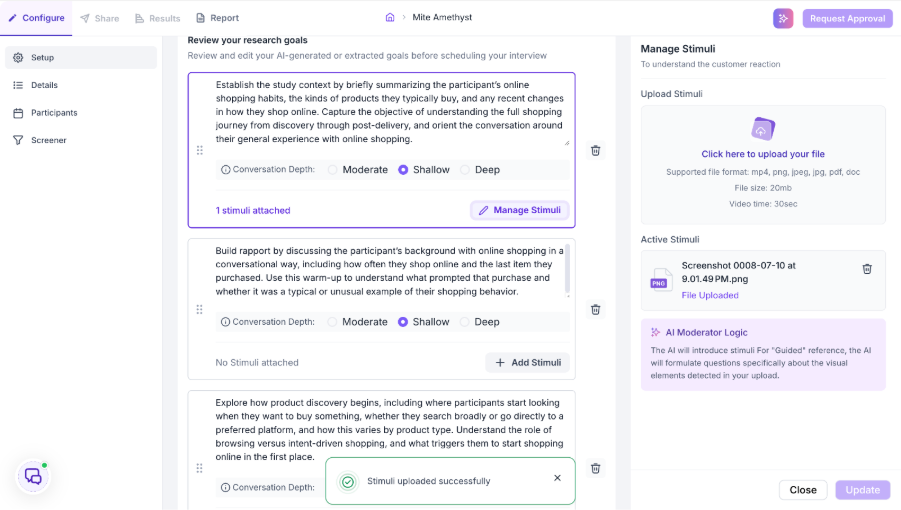
This creates a more interactive AI-moderated research experience and enables researchers to conduct concept testing, creative evaluation, product feedback, and other stimulus-based qualitative research directly within Decode.
Key Impact
- Enables researchers to attach stimuli to individual research goals.
- Supports images, videos, and other supported content within AI-Moderated Interviews.
- Integrates stimuli directly into the live participant interview experience.
- Allows the AI Moderator to use the active stimulus as context for the conversation.
- Enables more interactive concept testing, creative evaluation, and stimulus-based qualitative research.
5. Corporate Email Validation for SSO Signups
Overview
The SSO signup experience has been enhanced to ensure new registrations are created using supported corporate or work email domains.
What’s Changed
New users attempting to sign up through SSO using configured personal email domains are now prevented from completing account creation. Email domains are validated before a user account or workspace membership is created, while supported corporate email signups continue to work as expected.
This validation applies only to new SSO signups and does not affect existing users.
Key Impact
- Restricts new SSO registrations using configured personal email domains.
- Ensures email validation occurs before account or workspace membership creation.
- Maintains the existing experience for corporate email signups and current Decode users.
🛠 Bug Fixes & Platform Improvements
1. Preference Block Image Upload Support in Safari
Quantitative Research | Preference Block
Resolved an issue in Safari where users were unable to add more than one image to a Preference Block due to a browser console error. Multiple images can now be uploaded and managed successfully within Preference Blocks when using Safari.
2. AI Moderator Meeting Background Color Persistence
AI-Moderated Interviews | Study Details
Resolved an issue where changes made to the Meeting Background Color were lost when users navigated away from the Details page before publishing the study. Updated color configurations are now retained when navigating between study sections.
3. Conjoint CSV Export Improvements
Quantitative Research | Conjoint Analysis
Improved Conjoint study CSV exports to include relevant question and task context alongside respondent selections and response data. This makes exported results easier to interpret and reduces the need to manually cross-reference the data with the original study configuration.
4. Task Block Results Page Layout Improvements
Task Studies | Results
Resolved an issue where the presence of a Task Block caused the Results page to scroll horizontally and affected the overall page layout. Results pages now remain within the supported viewport and display correctly without unnecessary horizontal scrolling.