
Release Notes - 3rd July, 2026
This release introduces enhancements across subscription management, AI-powered insights, workspace administration, study creation, qualitative research, and overall platform usability.
Key highlights include the introduction of the new 365-day Free Plan with recurring monthly AI allowances, quick approval actions for Workspace Admins, AI-powered support for Conjoint Analysis, and several usability, workflow, and platform stability improvements across Decode.
🚀 Major Feature Enhancements
1. New Free Plan with Monthly Credit Reset
Overview
The existing 14-day Trial Plan has been replaced with a new 365-day Free Plan for all newly created workspaces. The new Free Plan provides longer access to Decode while introducing updated feature access, revised usage limits, and recurring monthly AI allowances, enabling users to continue exploring the platform over an extended period.
What's Changed
The Free Plan replaces the previous trial experience with a longer validity period, updated feature access, revised usage limits, and recurring monthly allowances for supported AI capabilities. Users now receive monthly recurring allowances for AI-powered features such as AI Research Copilot, Deep Context Queries, AI Reports, and tester responses, instead of consuming one-time trial limits.
Workspace and study usage limits have also been updated to align with the new Free Plan, and all feature access across the platform now follows the revised subscription configuration.
Key Impact
- Replaces the previous 14-day Trial Plan with a 365-day Free Plan.
- Introduces monthly recurring AI allowances for supported AI capabilities.
- Provides a more flexible onboarding experience for new users.
- Standardizes feature access and usage limits under the new Free Plan.
2. Quick Approval Actions for Workspace Admins
Overview
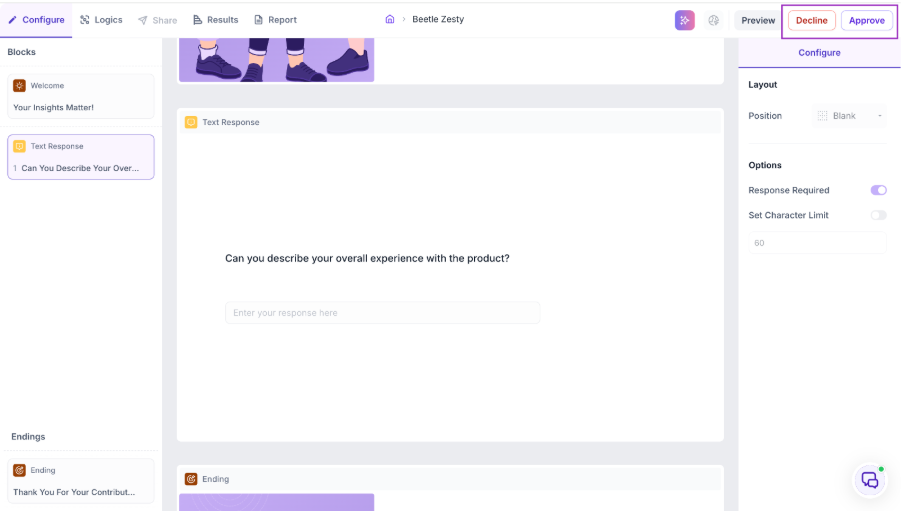
Workspace Admins can now manage approval requests more efficiently by taking action directly from the approval queue, eliminating the need to open each request individually.
What's Changed
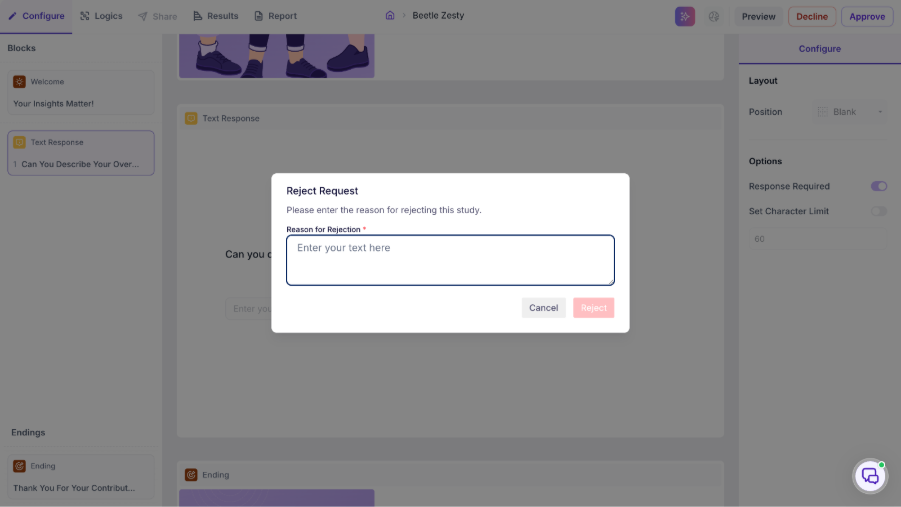
Pending approval requests now display Approve and Reject actions directly within the approval list, allowing Workspace Admins to take immediate action without opening individual requests.
Request statuses are updated instantly after approval or rejection, and requests are automatically moved to their respective sections. While rejecting a request, approvers can also provide an optional rejection reason directly from the approval queue.
Key Impact
- Enables faster processing of approval requests.
- Reduces the number of steps required to approve or reject requests.
- Improves the overall approval workflow for Workspace Admins.
- Allows admins to manage requests more efficiently from a single view.
Decline Request
3. AI Report Support for Conjoint Analysis
Overview
AI-powered research capabilities have been expanded to support Conjoint Analysis, enabling AI Reports and the AI Research Agent to generate structured insights for Conjoint studies.
What's Changed
AI Reports and the AI Research Agent can now interpret Conjoint Analysis responses and generate insights specific to Conjoint methodology.
The AI generates methodology-specific insights, including attribute importance, respondent preferences, feature trade-offs, optimal product configurations, and other Conjoint-specific findings, providing researchers with richer and more actionable outputs.
This enhancement extends AI support to one of Decode's advanced quantitative research methodologies, making Conjoint studies fully compatible with AI-powered reporting and analysis.
Key Impact
- Extends AI support to Conjoint Analysis studies.
- Generates methodology-specific insights for Conjoint research.
- Simplifies interpretation of complex quantitative research results.
- Helps researchers identify product preferences, feature trade-offs, and optimization opportunities more efficiently.
🛠 Bug Fixes & Platform Improvements
1. Facial Coding & Eye Tracking Selection Stability
Media Studies | Study Builder
Resolved an issue where selecting Facial Coding (FC) and Eye Tracking (ET) before the media subcategory finished loading could cause technology selections to reset and create duplicate technology entries. Technology selections are now retained consistently during media setup.
2. A/B Test Image Display Improvements
A/B Testing | Preview & Results
Resolved an issue where images uploaded for A/B Test studies appeared stretched or skewed in Preview and Results. Uploaded images now maintain their original aspect ratio, ensuring creatives are displayed accurately across supported views.
3. Task Block Screen Recording Improvements
Task Studies
Resolved an issue where screen recording continued after the Task Block ended when the Collect Feedback screen was displayed. Screen recording now stops immediately when the task is completed or the time limit is reached, ensuring recordings accurately reflect the intended task duration.
4. Thai Language Highlight Support
Qualitative Research | Highlights
Resolved an issue that prevented highlights from being created for Thai language transcripts due to minimum word selection validation. Highlights can now be created more accurately for Thai language content.
5. Team Member Addition Workflow Improvements
Workspace Management | Teams
Resolved an issue where the Add Users dropdown closed before users could complete the member addition process. The workflow now remains open, allowing administrators to add multiple team members without reopening the dialog.
6. Speaker Role Save Behaviour
Qualitative Research | Speaker Labels
Resolved an issue where speaker role changes were applied immediately, even when users cancelled without saving. Speaker roles are now updated only after clicking Save, while Cancel correctly discards any unsaved changes.
7. Group & Randomization Block Stability
Study Builder | Group & Randomization
Resolved an issue where dragging and dropping a question block into a Group & Randomization (G&R) block caused the block to become unresponsive. Users can now continue editing and managing questions within the G&R block without interruption.
8. Theme Filter Retention
Qualitative Research | Themes
Resolved an issue where applying filters within the right-side theme details drawer reset the selected filter and displayed all themes. Applied filters are now retained while navigating within the theme drawer, providing a more consistent browsing experience.