
Release Notes - 17th June, 2026
This release includes enhancements across AI Moderator, qualitative research workflows, media processing, analytics accuracy, study creation, workspace administration, and platform reliability. Key highlights include transcript downloads, improved speaker diarization, enhanced AI Moderator session handling, more accurate reporting, and several usability improvements across the platform.
AI Moderator Improvements
1. Improved Meeting Wrap-Up Experience
Overview
AI Moderator sessions previously ended immediately when the configured meeting duration was reached, which could interrupt participants mid-conversation and create an abrupt interview experience.
What's Changed
The moderator now monitors the remaining session duration and reserves approximately 10% of the meeting time for closure. During this period, it begins wrapping up the discussion, asks any final follow-up questions where relevant, and provides a closing message before ending the session.
Key Impact
- Creates a more natural and professional interview experience.
- Reduces the risk of losing important participant feedback towards the end of a session.
- Ensures interviews conclude with a clear and structured wrap-up.
2. Expanded Language Support for AI Moderator Media Processing
Overview
AI Moderator studies configured in supported non-English languages could experience media processing failures due to language validation inconsistencies. This prevented transcripts, summaries, and downstream AI workflows from being generated successfully.
What's Changed
Language validation and media processing workflows have been enhanced to correctly support all languages available during AI Moderator study configuration, including multilingual research studies.
Key Impact
- Improves reliability for international and multilingual research programs.
- Reduces processing failures for non-English studies.
- Ensures transcripts and AI-generated outputs are produced successfully across supported languages.
3. Improved Access to Ongoing Qualitative Sessions
Overview
Users attempting to join an active qualitative session during the final 15–20 minutes of the scheduled meeting duration could incorrectly receive a "Meeting Expired" message, preventing access to an ongoing session.
What's Changed
Meeting validation logic has been updated to allow participants, moderators, and observers to join active sessions at any point before the scheduled meeting end time.
Key Impact
- Prevents users from being locked out of active sessions.
- Improves reliability of scheduled interviews and stakeholder observations.
- Reduces meeting disruptions and support requests related to session access.
Qualitative Studies & Transcripts
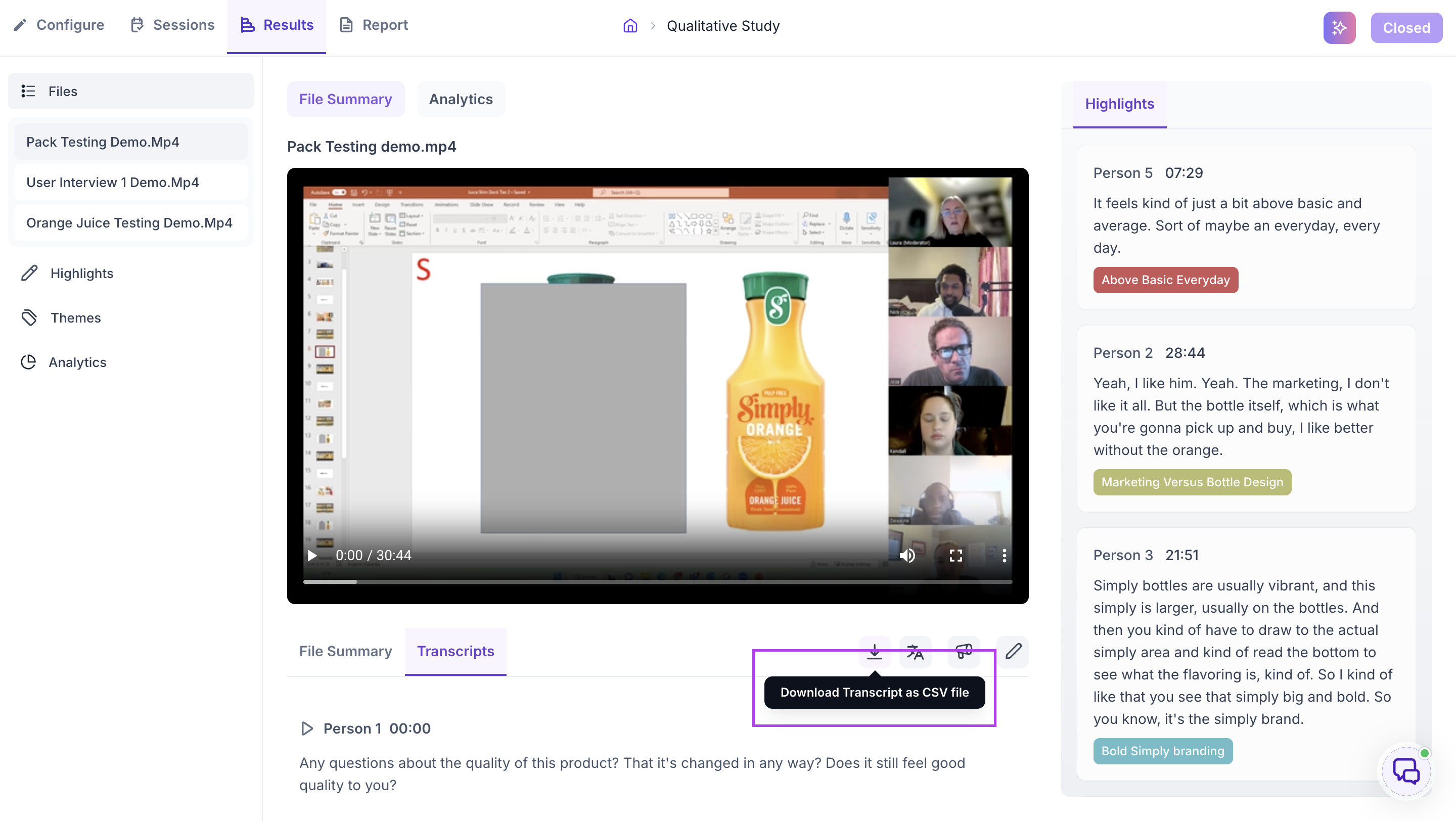
1. Transcript Download Support
Overview
Researchers could view transcripts within Decode but did not have a direct way to download them for offline review, stakeholder sharing, or further analysis.
What's Changed
A transcript download option has been added to the Session Details page, allowing researchers to export session transcripts directly from the platform.
Key Impact
- Simplifies transcript sharing with stakeholders and clients.
- Reduces manual effort spent copying transcript content.
- Improves post-research analysis and reporting workflows.
2. Improved Transcript Translation Reliability
Overview
Transcript translation jobs for uploaded media files could occasionally fail, preventing translated transcripts from being generated and limiting multilingual analysis.
What's Changed
The transcript translation workflow has been enhanced to improve processing reliability and ensure translated transcripts are generated successfully across supported languages.
Key Impact
Enables smoother multilingual research workflows.
Improves accessibility of research findings across global teams.
Reduces failures during transcript translation and review.
3. Improved Speaker Label Availability
Overview
The Speaker Label option could become available before all required processing was complete, creating confusion when researchers attempted to use speaker identification features.
What's Changed
The Speaker Label option is now displayed only after tonality processing has successfully completed and the required speaker identification data is available.
Key Impact
Provides a clearer and more intuitive transcript review workflow.
Prevents users from accessing speaker labeling before data is ready.
Reduces confusion during transcript analysis.
4. Improved Speaker Diarization Accuracy for Qualitative Sessions
Overview
In certain qualitative sessions, moderator and participant responses could be grouped under the same speaker label, making transcripts difficult to review and reducing the accuracy of downstream analysis.
What's Changed
Speaker diarization has been enhanced to improve speaker separation and attribution across qualitative sessions. Moderator and participant speech are now identified and assigned more accurately, including scenarios where the spoken language differs from the configured meeting language.
Key Impact
- Improves transcript accuracy and readability.
- Reduces manual effort required to correct speaker labels.
- Provides more reliable inputs for summaries, highlights, and AI-generated insights.
Media & Recordings
1. Improved Recording Access Through Direct Links
Overview
Recordings accessed through bookmarked or shared URLs could fail to load because the required workspace context was not being correctly initialized when the page was opened directly.
What's Changed
The recording page initialization workflow has been enhanced to correctly retrieve and apply workspace information when recordings are accessed through direct links.
Key Impact
- Enables reliable access to recordings through shared and bookmarked URLs.
- Improves collaboration across distributed teams.
- Reduces support requests related to inaccessible recordings.
2. Improved PDF Processing Reliability
Overview
Certain PDF files could fail during processing due to document retrieval issues, preventing summaries, highlights, and other document intelligence features from being generated.
What's Changed
Document retrieval and processing workflows have been improved to ensure PDF files are fetched and processed successfully before AI-powered analysis begins.
Key Impact
- Improves reliability of document intelligence workflows.
- Ensures summaries and highlights are generated successfully.
- Reduces processing failures for uploaded research documents.
3. Improved Media Navigation Experience
Overview
When navigating back to a media file after returning to the dashboard, users could see unrelated files loaded within the Files tab instead of returning to the previously viewed media item.
What's Changed
Navigation state handling has been improved to preserve media context and ensure users return to the correct file and tab when navigating back.
Key Impact
- Creates a more predictable navigation experience.
- Reduces confusion when reviewing media assets.
- Improves efficiency during media analysis workflows.
Platform Experience & Reliability
1. Improved Preview Link Reliability
Overview
Preview links could fail to load when opened in incognito windows or browser sessions where the user was not logged into Decode, limiting the ability to share content externally.
What's Changed
Preview link validation and access workflows have been updated to correctly support publicly accessible preview links without requiring an active user session.
Key Impact
- Makes preview links more reliable for stakeholder sharing.
- Supports review workflows outside the platform.
- Reduces issues when accessing previews from different browsers or devices.
2. Help Center Access Improvements
Overview
Clicking the Help option from the dashboard could occasionally fail to launch the support widget, preventing users from accessing assistance when needed.
What's Changed
The Help workflow has been enhanced to ensure the support widget initializes and opens correctly when accessed from the platform.
Key Impact
- Provides faster access to support resources.
- Reduces friction when seeking assistance.
- Improves overall platform usability.
3. Improved Error Notification Handling
Overview
Error notifications could be repeatedly triggered while scrolling through documents, resulting in multiple duplicate toast messages appearing on screen.
What's Changed
Notification handling has been enhanced to prevent duplicate error messages from being displayed for the same event during document navigation.
Key Impact
- Reduces UI clutter and distractions.
- Improves the document review experience.
- Prevents confusion caused by repeated error messages.
Results & Analytics Improvements
1. AOI Alignment Improvements Across Image-Based Studies
Overview
The AOI creation overlay could become misaligned with uploaded images in A/B Test, Preference Test, and 5-Second Test studies, making AOI creation inaccurate and affecting visual analysis.
What's Changed
AOI rendering has been updated to correctly align with image boundaries and scale consistently across supported study types.
Key Impact
- Improves AOI creation accuracy.
- Ensures more reliable visual attention analysis.
- Reduces manual adjustments during AOI setup.
2. Improved Drop-Off & Completion Rate Accuracy
Overview
Drop-off counts and completion metrics could display incorrect values when response filters were applied, particularly for studies using Face Coding and Eye Tracking. In some cases, drop-offs were reported as zero or reflected under incorrect metrics.
What's Changed
Response filtering and metric calculations have been updated to ensure drop-off counts, completion rates, and summary metrics accurately reflect the selected response set.
Key Impact
- Improves confidence in study reporting.
- Ensures filtered results accurately represent participant behavior.
- Reduces discrepancies between summary and block-level metrics.
3. Improved Preference Test Filtering
Overview
When filters were applied within Preference Test studies, heatmaps updated correctly but emotion metrics continued to display unfiltered results, leading to inconsistencies in analysis.
What's Changed
Emotion metrics now refresh and recalculate based on the selected filters, ensuring all insights remain synchronized with the filtered audience.
Key Impact
- Improves consistency across insights and visualizations.
- Enables more accurate audience segment analysis.
- Provides greater confidence in filtered results.
4. Improved Emotion Analytics Consistency
Overview
For Media Testing, YouTube, and Vimeo studies, dominant emotions could display calculated values even when the underlying raw emotion metrics were unavailable or reported incorrectly.
What's Changed
Emotion processing and reporting workflows have been enhanced to ensure consistency between raw emotion metrics and aggregated emotion outputs.
Key Impact
- Improves trust in emotion-based insights.
- Provides greater consistency across analytics outputs.
- Reduces confusion when interpreting emotional response data.
5. Improved Top Answer Reporting
Overview
In certain quantitative studies, valid response values of "0" could be incorrectly displayed as "NA" within results dashboards, despite being correctly identified elsewhere in the platform.
What's Changed
Results reporting has been updated to correctly recognize and display zero as a valid response value across dashboard views.
Key Impact
- Improves reporting accuracy.
- Ensures consistency across dashboard and AI-generated insights.
- Prevents misinterpretation of study results.
6. Improved AI Report Benchmark Synchronization
Overview
Updates made to benchmark scores were not always reflected in AI-generated reports, causing reports to display outdated benchmark comparisons.
What's Changed
AI Reports now automatically reflect the latest benchmark values configured within the study, ensuring report outputs remain aligned with current benchmark settings.
Key Impact
- Improves report accuracy and consistency.
- Ensures benchmark comparisons reflect the latest data.
- Reduces manual verification of report outputs.
7. Improved Export Handling for Media-Only Studies
Overview
Studies containing only Media blocks could trigger a system error when users attempted to download results, creating confusion around export availability.
What's Changed
The export workflow now handles unsupported export scenarios more gracefully and provides clearer guidance when CSV downloads are not available for a study.
Key Impact
- Eliminates unnecessary export errors.
- Provides a clearer user experience.
- Helps researchers understand export limitations without encountering failures.
Study Creation & Management
1. Improved Block Deletion Workflow
Overview
Deleting a block within a study could unexpectedly redirect users back to the Welcome Page, disrupting the study creation flow and requiring additional navigation to continue editing.
What's Changed
The block deletion workflow has been updated to maintain the user's position within the study. After a block is deleted, users are automatically redirected to the previous block in the sequence.
Key Impact
- Creates a smoother study-building experience.
- Reduces unnecessary navigation during study setup.
- Improves efficiency when editing complex studies.
2. Enhanced Study Creation Feedback
Overview
After selecting "Create From Scratch," users did not receive any visual indication that the study was being created, making the platform appear unresponsive.
What's Changed
Loading indicators and progress feedback have been added during study creation to clearly communicate that the request is being processed.
Key Impact
- Provides immediate feedback to users.
- Reduces repeated clicks and duplicate actions.
- Improves confidence during study creation.
3. Improved Live Interview Validation
Overview
Moderators and Observers could be configured using the same email address during interview setup, leading to configuration errors and confusion during scheduling.
What's Changed
Validation has been introduced to prevent the same email address from being assigned to both Moderator and Observer roles. Users are now prompted to resolve the issue before publishing the interview.
Key Impact
- Prevents interview setup errors.
- Improves scheduling accuracy.
- Creates a more intuitive configuration experience.
4. Character Limits for Interview Studies
Overview
Interview studies previously allowed unlimited text input for screening questions, Welcome Pages, and Screenout Pages, which could lead to formatting and usability issues.
What's Changed
Character limits have been introduced across key interview study configuration areas, helping ensure content remains manageable and consistent.
Key Impact
- Prevents excessively long content from affecting participant experience.
- Improves consistency across interview setup pages.
- Reduces formatting and usability issues during study creation.
5. Improved Pipe Answer Configuration Experience
Overview
When users closed the Pipe Answer configuration dialog, previously selected values remained available when reopening the dialog. This behavior was correct but could be confusing due to the terminology used within the interface.
What's Changed
The dialog experience and associated terminology have been updated to better reflect how selections are retained during configuration.
Key Impact
- Aligns user expectations with actual system behavior.
- Reduces confusion during survey configuration.
- Improves overall usability of advanced survey logic.
6. Improved YouTube & Vimeo Validation Feedback
Overview
After resetting a YouTube or Vimeo URL, the validation styling could continue to indicate a valid configuration even though the media link had been removed.
What's Changed
Validation states now refresh correctly when media URLs are reset, ensuring the interface accurately reflects the current configuration status.
Key Impact
- Ensures validation status accurately reflects the current media configuration.
- Reduces configuration errors during study setup.
- Improves confidence when updating or replacing media assets.
Live Interviews & Session Management
1. Improved Availability Scheduling Layout
Overview
When configuring multiple availability slots within a Live Interview study, time slots could appear visually misaligned, making it difficult to identify which slots belonged to a particular day.
What's Changed
The scheduling interface has been refined to improve alignment and visual separation between days and time slots. Additional visual cues have been introduced to make schedules easier to interpret during setup.
Key Impact
- Improves scheduling clarity for moderators and researchers.
- Reduces confusion when configuring multiple interview slots.
- Creates a more intuitive interview setup experience.
2. Improved Session Metrics Accuracy
Overview
Interview sessions marked as "No Show" were being included in Total Session counts across study dashboards and library views, resulting in inflated session metrics.
What's Changed
Session aggregation logic has been updated to exclude no-show interviews from completed session metrics. Reporting now more accurately reflects actual interview activity.
Key Impact
- Improves accuracy of study reporting and usage metrics.
- Prevents overstatement of completed interview activity.
- Provides researchers with a clearer view of study progress.
Survey Experience Improvements
1. Improved Mobile Response Display
Overview
Long answer options in survey questions could break across lines at incorrect positions on mobile devices, making responses difficult to read and impacting the participant experience.
What's Changed
Answer option rendering has been improved across question types to ensure words wrap correctly and maintain readability on smaller screens.
Key Impact
- Improves survey readability on mobile devices.
- Creates a cleaner participant experience.
- Reduces confusion when reviewing longer answer choices.
Workspace & User Management
1. Business Email Validation for Account Registration
Overview
Users could create accounts using personal email addresses, making it difficult for organizations to maintain consistent workspace governance and user management practices.
What's Changed
Account registration now supports business-email validation, allowing organizations to restrict sign-ups to approved corporate email domains while continuing to support existing domain management and whitelisting workflows.
Key Impact
- Strengthens workspace governance and security.
- Encourages organization-based account management.
- Reduces the use of personal email addresses for business workspaces.
2. Improved Team Assignment Visibility
Overview
Invited users who had not yet completed workspace sign-up did not display their assigned team information, making it difficult for administrators to verify team assignments and invitation status.
What's Changed
Team assignments are now visible immediately after a user is invited, regardless of whether they have completed the sign-up process.
Key Impact
- Improves visibility for workspace administrators.
- Simplifies user and team management.
- Reduces confusion during onboarding and user provisioning.
3. Improved Team Management Experience
Overview
Team management workflows contained unclear labels, messaging, and empty-state content, making it difficult for administrators to understand available actions.
What's Changed
Empty-state messaging, button labels, and team management terminology have been updated to provide clearer guidance and improve consistency across workspace administration workflows.
Key Impact
- Creates a more intuitive administration experience.
- Improves clarity during team setup and user management.
- Reduces ambiguity across team management workflows.
AI Creative & Media Insights
1. Improved AI Creative Processing for Long Videos
Overview
AI Creative studies could fail to generate insights when video creatives exceeded certain durations, resulting in missing summaries, zero scores, and unsuccessful insight generation.
What's Changed
Creative processing workflows have been enhanced to improve support for longer video assets and ensure insight generation completes successfully across supported video lengths.
Key Impact
Expands support for long-form creative testing.
Improves reliability of AI-generated creative insights.
Reduces failed processing scenarios for video-based studies.
2. Improved Emotion Analytics Consistency
Overview
Emotion insights could occasionally display inconsistencies between raw emotion metrics and aggregated emotional outputs, making interpretation more difficult.
What's Changed
Emotion processing and aggregation workflows have been refined to ensure greater consistency between underlying emotion signals and the insights presented within Media Testing, YouTube, Vimeo, and related study types.
Key Impact
- Improves trust in emotion-based insights.
- Provides more consistent analytics outputs.
- Enhances confidence when interpreting emotional response data.
3. Improved Media Insights Filtering Accuracy
Overview
After applying response filters, certain media insights and emotion metrics could continue displaying unfiltered results, creating inconsistencies between visualizations and reported insights.
What's Changed
Filtering workflows have been enhanced to ensure all related metrics, emotion insights, and visualizations are updated consistently based on the selected response segment.
Key Impact
- Improves confidence in filtered analysis.
- Ensures greater consistency across insights and visualizations.
- Supports more accurate audience segmentation and reporting.